Why “single vendor record” is the modern due diligence upgrade
Most vendor programs don’t need more questionnaires. They need governance that sticks:
- Who owns this vendor relationship?
- Is it critical?
- What data does it touch?
- When was it last reviewed?
- What evidence supports our decision?
- What exceptions are active and when do they expire?
If you’re trying to pass ISO 27001 or SOC 2 (or respond to enterprise buyers), vendor management becomes a high-scrutiny control. SharePoint can make it clean and repeatable.
What auditors and buyers actually expect from vendor due diligence
- inventory of vendors
- tiering based on risk
- security requirements (not just procurement)
- reviews on a cadence (annual/quarterly for critical)
- decisions recorded (approved/conditional/exit plan)
- exceptions tracked with expiry dates
- evidence produced quickly
The “Vendor Record + evidence links” pattern checks all 7.
What “Vendor Record” means in SharePoint (simple definition)
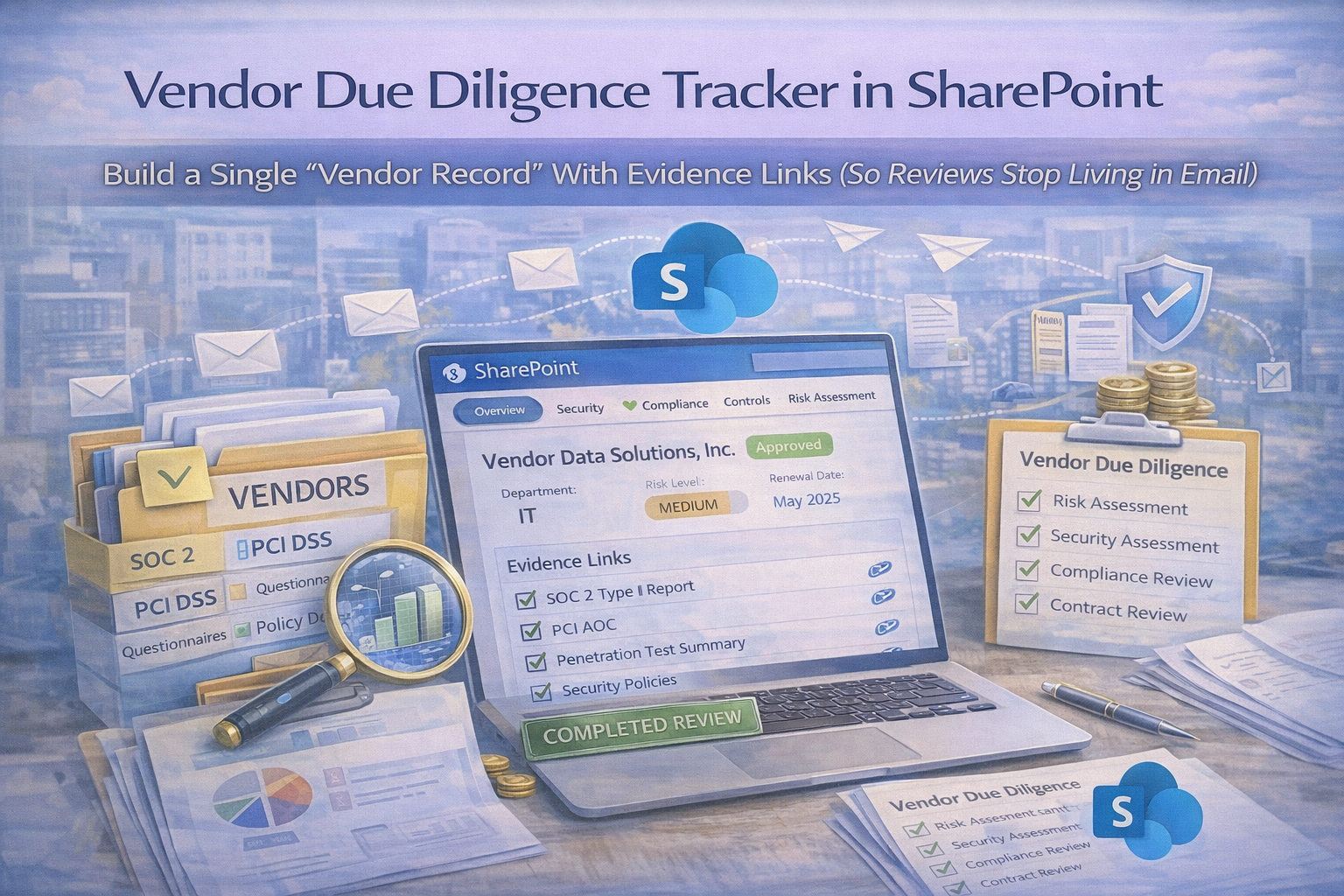
A Vendor Record is one SharePoint List item that includes vendor identity and owner, risk tier and criticality, data types handled, review cadence and next due date, assurance status, active risks/exceptions with expiry dates, direct links to evidence, and decision history.
It’s not a folder. It’s a living record tied to evidence.
The SharePoint build: Vendor Record + Evidence Links
Step 1: Create a “Vendor Register” (SharePoint List)
This is your single source of truth. If a vendor isn’t in the register, it isn’t governed.
Recommended Vendor Register fields (audit-ready)
| Section |
Fields to include |
Why it matters |
| Vendor basics |
Vendor name, category, business owner, security owner, procurement/legal owner |
Accountability is the #1 governance gap |
| Risk and scope |
Tier, data types (PII/confidential), access type, service criticality, hosting regions, subprocessor use |
Explains why cadence and requirements differ |
| Contract and lifecycle |
Contract start, renewal date, termination notice, incident notification requirement + timeframe, DPA in place |
Renewal timing is where you have leverage |
| Due diligence & evidence |
Assurance type, last review date, next review due, RAG status, evidence pack link, SOC/ISO link, questionnaire link, contract/DPA link, risk acceptance link(s) |
Makes audit sampling instant |
| Decision |
Decision (approved/conditional/not approved), conditions summary, decision date, decision approver |
Evidence without a decision still fails audits |
Pro tip (prevents decay)
Make Tier, Business Owner, Renewal Date, Last Review, and Next Review mandatory. If any of those are missing, the vendor record is incomplete.
Step 2: Create a “Vendor Evidence Library” (SharePoint Document Library)
This is where proof lives tagged to the vendor record so evidence is searchable, filterable, and time-bound.
Evidence metadata (the traceability keys)
- Vendor name (lookup to Vendor Register if possible)
- Evidence type (SOC report, questionnaire, pen test, contract, DPA, review notes, incident record)
- Evidence period (YYYY or quarter)
- Status (current / expired / superseded)
- Approved? (Yes/No) + approval date
Folder structure (simple)
Vendor Evidence/
Vendor A/
SOC2_2025.pdf
SecurityQuestionnaire_2026-01.docx
VendorReviewNotes_2026-Q1.pdf
DPA_Addendum.pdf
PenTestSummary_2026.pdf
Vendor B/
Vendor C/
Trend that works: store the review notes + decision with the evidence, not just the PDFs.
Step 3: Link evidence directly inside the Vendor Record
In the Vendor Register, include clickable links to the evidence pack folder, latest SOC/ISO, latest questionnaire, contract/DPA, review notes, and risk acceptance items.
The “auditor wow” moment
An auditor opens one vendor record and can click directly to evidence, see last review date, confirm cadence, and verify decisions without hunting.
The due diligence workflow (how the record stays current)
A tracker is only useful if it runs itself. Start with practical tier rules and calculate next review dates automatically.
| Tier |
Cadence (practical default) |
What to store as evidence |
| Critical |
Annual deep review + quarterly monitoring |
Review notes + decision + SOC/ISO + open issues |
| High |
Annual review |
Checklist + assurance + decision |
| Medium |
Every 18–24 months |
Questionnaire refresh + decision |
| Low |
Onboarding only, review on change |
Basic record + onboarding proof |
“Vendor Review” checklist (attach to the record)
Your review does not need to be heavy. It needs to be consistent. For Critical/High vendors, record:
- assurance received (SOC 2 / ISO / questionnaire)
- security requirements met (MFA, incident notice, encryption, access controls)
- subprocessor transparency confirmed
- retention/deletion terms confirmed
- open issues and conditions
- decision recorded + approver named
No more email approvals: use Teams Approvals for decisions
For high-risk vendors, approvals should be auditable. Use Teams Approvals for “Approved with conditions,” “Risk acceptance required,” and “Renewal approval,” then link the approval result back to the Vendor Record.
What the “single vendor record” solves (real outcomes)
1) Faster enterprise approvals
When customers ask “How do you manage vendors?”, you can show tiering, cadence, evidence packs, and decisions without scrambling.
2) Cleaner ISO 27001 & SOC 2 audits
Auditors sample vendors. With Vendor Records, sampling is easy: pick 3–5 critical vendors, open records, verify evidence and cadence.
3) Less operational risk at renewal
Renewals stop being blind. You know what evidence is current, what risks exist, what conditions are open, and what must be renegotiated.
Want a “click-to-evidence” vendor program (not a spreadsheet program)?
If vendor reviews are stuck in email threads, we can implement a SharePoint Vendor Record system with tiering, review cadence, evidence links, and dashboards.
Common mistakes (and how to avoid them)
- Storing evidence but not decisions → add Decision + Approver + Conditions fields.
- No review cadence → tier vendors and calculate next review due.
- Evidence not linked → store evidence links inside each vendor record.
- No exception tracking → link risk acceptances with expiry reminders.
- Over-reviewing low-risk tools → deep review Critical/High only.
Download the SharePoint Vendor Record Template
Want to implement this fast? Download the template pack and start building your single vendor record system.
Template includes:
- SharePoint Vendor Register column map
- Evidence Library metadata model
- Vendor tiering rules
- Review checklist (annual + quarterly)
- Dashboard views (Overdue Reviews, Renewals, High-Risk Vendors)
Follow Canadian Cyber
Practical cybersecurity + compliance guidance: