Evidence Folder Naming Conventions Auditors Love (SharePoint + ISO 27001)
A simple, audit-ready naming standard that makes ISO 27001 evidence easy to find, easy to scan, and easy to defend
Audits get stressful for one simple reason:
evidence exists but nobody can find it fast.
If your SharePoint libraries are full of files named like final_v2_NEW(1).pdf,
your ISO 27001 audit becomes a treasure hunt.
Auditors don’t want that.
They want proof that’s organized, consistent over time, and easy to review.
This guide gives you an auditor-friendly evidence naming convention for ISO 27001 in SharePoint plus examples, folder rules, a quick policy you can publish, and common mistakes to avoid.
✅ Quick answer (for fast readers and AI search)
Best SharePoint ISO 27001 evidence naming format:
[Process]_[EvidenceType]_[System]_[YYYY-MM]_[Owner/Team]
Example:
AccessManagement_AccessReview_AzureAD_2026-01_IT
- Find evidence in seconds
- Show consistent control operation across months
- Reduce audit time (and audit pain)
Want an audit-ready SharePoint evidence setup built for your ISMS?
Canadian Cyber helps teams build evidence libraries that auditors can navigate fast with structure, naming rules,
ownership, and tracking.
1) Why naming conventions matter in ISO 27001 audits
Auditors typically test:
- A set of controls
- Across a time period (often 6–12 months)
- Looking for consistency and traceability
If you can’t quickly show what this file is, when it happened, and
who owns it, your audit slows down.
And your cost goes up.
A naming convention makes evidence:
- Scannable (you can visually confirm patterns)
- Sortable (by date and process)
- Traceable (owner/team is clear)
- Repeatable (same evidence, every month)
2) The best naming convention template (copy/paste)
✅ Evidence File Naming Format
[Process]_[EvidenceType]_[System]_[YYYY-MM]_[Owner/Team]
What each part means
| Field | What it is | Examples |
|---|---|---|
| Process | ISMS process area | AccessManagement, ChangeManagement, IncidentManagement |
| EvidenceType | The artifact you show the auditor | AccessReview, ChangeLog, TrainingReport, IncidentReport |
| System | Source of truth system | AzureAD, Jira, Defender, Intune, ServiceDesk |
| YYYY-MM | Evidence period (month) or use YYYY-Q# | 2026-01, 2025-Q4 |
| Owner/Team | Accountable owner | IT, HR, DevOps, SecOps, GRC, Procurement |
Auditor-friendly examples
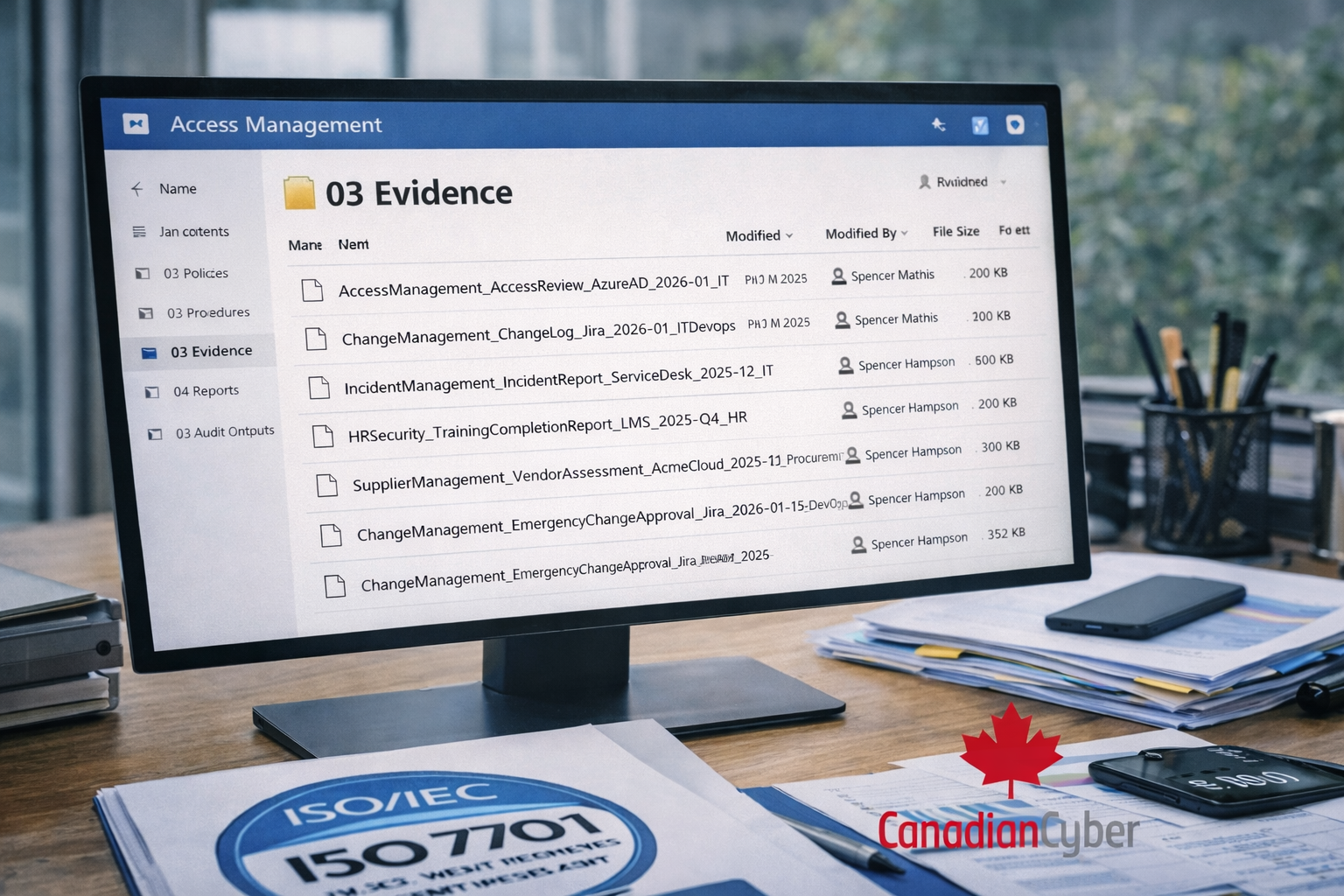
- AccessManagement_AccessReview_AzureAD_2026-01_IT
- ChangeManagement_ChangeLog_Jira_2026-01_DevOps
- IncidentManagement_IncidentReport_ServiceDesk_2025-12_IT
- HRSecurity_TrainingCompletionReport_LMS_2025-Q4_HR
- SupplierManagement_VendorAssessment_AcmeCloud_2025-11_Procurement
3) Folder naming conventions (SharePoint) that keep audits calm
A good folder system does two things:
it stays stable, and it groups evidence in a way auditors can review fast.
Recommended folder structure (simple and scalable)
Option (most practical): by process
- Access Management
- Change Management
- Incident Management
- HR Security
- Supplier Management
- Risk Management
Inside each process folder:
- 01 Policies
- 02 Procedures
- 03 Evidence
- 04 Reports
- 05 Audit Outputs
Inside 03 Evidence (optional subfolders):
- Access Reviews
- Joiner-Mover-Leaver
- Privileged Access
- Exceptions
- Tickets & Approvals
Folder naming rules auditors like
- Use Title Case for process folders (e.g., “Access Management”)
- Use numbers for consistent ordering (01, 02, 03)
- Avoid vague folders like Misc, Old, New, Final
- Don’t redesign the folder tree every quarter
Want a ready-to-use SharePoint evidence folder blueprint (ISO 27001 + your tools)?
We can map your evidence structure to your controls, your scope, and your systems —
so auditors can review fast and teams can maintain it easily.
4) How to name recurring vs one-time evidence
ISO 27001 evidence usually comes in two flavors:
recurring and event-based.
Name them differently so the timeline is obvious.
1) Recurring evidence (monthly / quarterly)
Use YYYY-MM or YYYY-Q#.
- AccessManagement_AccessReview_AzureAD_2026-01_IT
- VulnerabilityManagement_ScanReport_Defender_2026-01_SecOps
- HRSecurity_TrainingCompletionReport_LMS_2025-Q4_HR
2) One-time evidence (date-specific)
Use YYYY-MM-DD for incidents, exceptions, and major approvals.
- IncidentManagement_IncidentReport_ServiceDesk_2026-01-08_IT
- RiskManagement_RiskTreatmentPlan_ISMS_2026-01-12_GRC
- AccessManagement_PrivilegedAccessException_AzureAD_2026-01-19_IT
3) Evidence tied to tickets
Append the ticket key at the end.
- ChangeManagement_EmergencyChangeApproval_Jira_2026-01-15_DevOps_CHG-2184
- IncidentManagement_PostIncidentReview_ServiceDesk_2026-01-08_IT_INC-1042
5) The “auditor scan test” (a 10-second self-check)
Open a folder and ask:
“Can someone understand each file in 5 seconds without opening it?”
If the answer is yes, your naming works.
If the answer is no, add clarity using:
Process, Evidence Type, System,
Date, and Owner.
6) Common mistakes (and how to fix them)
| Mistake | Fix |
|---|---|
| “Final_v3_reallyfinal.pdf” | Use SharePoint version history. Keep file names clean and consistent. |
| Missing dates | Always include YYYY-MM or YYYY-MM-DD. Auditors test time windows. |
| Too many naming styles across teams | Pick one standard. Enforce it with examples and a short policy. |
| Folder redesign every quarter | Keep structure stable. Add subfolders if needed. Don’t rebuild the tree. |
7) A ready-to-use naming convention policy (short)
Evidence Naming Policy (SharePoint)
All ISO 27001 evidence files must follow:
[Process]_[EvidenceType]_[System]_[YYYY-MM]_[Owner/Team]
For one-time events, use YYYY-MM-DD.
For ticket-linked evidence, append the ticket ID at the end (e.g., CHG-2184).
Evidence must be stored in the correct process folder under 03 Evidence.
8) FAQs
Do we have to follow Annex A naming?
No. Auditors care about traceability and clarity.
If you can map processes to controls in your ISMS documentation, process-based naming is often easier.
Folders or a SharePoint list (evidence register)?
Folders work for storage.
A SharePoint list helps with ownership, reminders, and tracking.
Many organizations use both.
How much evidence is enough?
Enough to show the control operates consistently over time.
That usually means recurring evidence plus key decisions, reviews, and exceptions.
🚀 Ready to simplify your ISO 27001 audit evidence in SharePoint?
If you want an evidence system that’s easy for teams and easy for auditors, Canadian Cyber can help you build:
- A clean SharePoint evidence repository
- Naming conventions and templates
- Ownership + recurring reminders
- Audit-ready evidence tracking
Follow Canadian Cyber
Get practical ISO 27001, SOC 2, and governance insights — built for real teams.