Manufacturing Cybersecurity • Zero Trust • OT & IoT Security
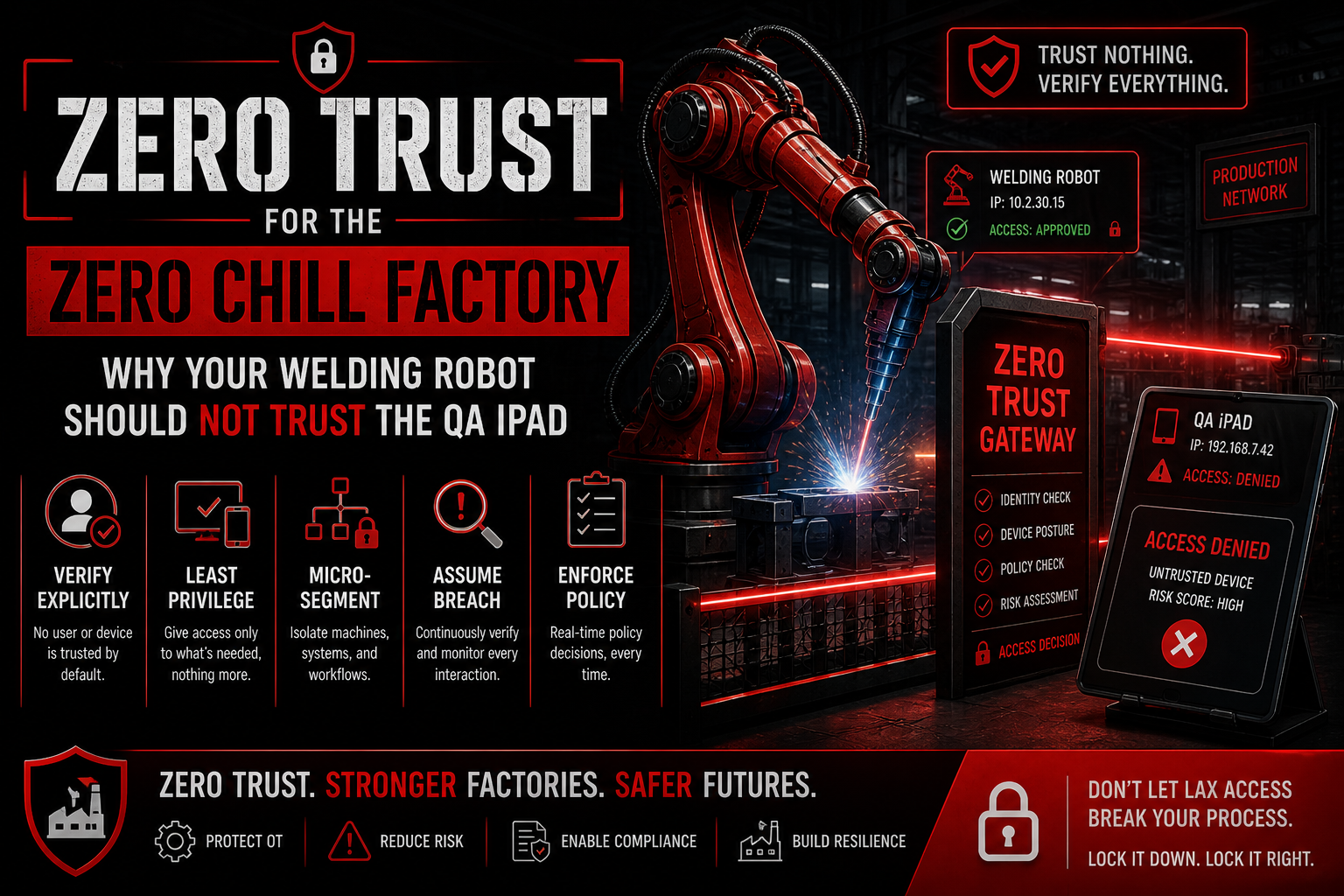
Zero Trust for the Zero Chill Factory: Why Your Welding Robot Should Not Trust the QA iPad
Modern factories need Zero Trust thinking because tablets, robots, sensors, vendor portals, Wi-Fi, and production systems should not automatically trust each other just because they are connected.
Quick Snapshot
| Zero Trust Area | Factory Security Goal |
|---|---|
| Network Segmentation | Separate production equipment, QA devices, vendor access, corporate systems, and guest Wi-Fi. |
| Device Verification | Only known, managed, approved devices should receive trusted access. |
| Least Privilege | Robots, tablets, vendors, and users should access only what they truly need. |
| Monitoring | Watch for unusual traffic, new devices, vendor logins, failed access attempts, and internal movement. |
Introduction
Your factory floor is connected.
- The welding robot talks to production systems.
- The QA iPad uploads inspection results.
- The maintenance laptop connects to equipment.
- The vendor portal supports remote troubleshooting.
- The ERP system tracks output.
- The Wi-Fi network keeps everyone moving.
That connectivity makes operations faster. It also creates a problem: too many devices trust each other just because they are on the same network.
Your welding robot should not automatically trust a QA iPad. Your packaging line should not trust a contractor laptop. Your ERP system should not trust every device on the plant floor.
In simpler terms: Zero Trust means every user, device, system, and connection must prove it should have access before it gets access.
Is Your Factory Trusting Too Much?
Canadian Cyber helps manufacturers apply practical Zero Trust principles across production networks, vendor access, IoT devices, tablets, and critical systems.
Why Factories Need Zero Trust Thinking
Factories used to be more isolated. Now they rely on connected systems that support speed, quality, maintenance, and visibility.
Modern factories often rely on:
- IoT sensors
- robotics
- tablets
- cloud dashboards
- vendor remote access
- production monitoring
- wireless networks
- maintenance software
- ERP integrations
- quality management systems
A compromised tablet, laptop, or vendor account can become a path into more critical systems if the network is too trusting.
Zero Trust helps reduce that risk by making access intentional, limited, verified, and monitored.
A Common Scenario
Picture this: a QA inspector uses an iPad on the shop floor.
The device connects to Wi-Fi, uploads inspection photos, and accesses quality records. That seems harmless.
But if the iPad is compromised, poorly managed, or connected to the wrong network, it could potentially reach:
- production dashboards
- file shares
- maintenance systems
- robotics controllers
- cloud portals
- sensitive customer specifications
Now the QA iPad is no longer just a tablet. It is a possible entry point.
That is why the welding robot should not trust it automatically.
1. Segment the Factory Network
Zero Trust starts with segmentation.
Do not put everything on one flat network.
| Network Area | Why Separate It |
|---|---|
| Production equipment | Protects robots, lines, and operational systems from unnecessary access. |
| Corporate systems | Keeps office systems separate from OT and shop-floor equipment. |
| Guest Wi-Fi | Prevents visitor devices from reaching business or production assets. |
| Vendor access | Controls remote troubleshooting paths and limits exposure. |
| QA devices | Lets tablets access quality apps without reaching robotics controllers. |
| Critical servers | Limits access to systems that support production, ERP, and monitoring. |
The QA iPad may need access to the quality app. It does not need access to robot controllers.
Need a Practical Segmentation Review?
We help manufacturers separate production equipment, QA devices, engineering workstations, corporate systems, vendors, and critical servers without disrupting operations.
2. Verify Every Device
Every device should be known, managed, and approved.
Track:
- device owner
- device type
- location
- purpose
- network access
- patch status
- security controls
- last review date
Unknown devices should not have trusted access. If a tablet, laptop, or sensor is not in the inventory, the network should treat it cautiously.
3. Use Least Privilege
Every user and device should only access what it needs.
| Factory Role or Device | Least Privilege Example |
|---|---|
| QA tablets | Access inspection apps, not robot controllers. |
| Maintenance laptops | Access approved equipment only. |
| Vendors | Access specific systems for specific windows. |
| Production robots | Communicate only with required systems. |
| Office users | Do not access OT networks by default. |
Least privilege reduces blast radius. If one account or device is compromised, the attacker gets less.
4. Control Vendor Remote Access
Vendors often need access to factory systems. That access should be controlled tightly.
Use:
- named vendor accounts
- MFA where possible
- approval before sessions
- time-limited access
- session logging
- access reviews
- removal of inactive vendors
Vendor access should never be permanent, shared, or invisible.
Are Vendors Over-Trusted in Your Factory?
Canadian Cyber helps manufacturers review vendor accounts, remote sessions, access windows, MFA, logging, and inactive vendor access.
5. Monitor East-West Movement
Factory security is not only about blocking outside attackers. It is also about watching movement inside the environment.
Monitor for:
- unusual device communication
- unexpected access between networks
- vendor logins outside approved windows
- new devices appearing
- failed login attempts
- strange traffic from tablets or laptops
- configuration changes on critical systems
Zero Trust assumes compromise is possible. Monitoring helps detect it faster.
6. Protect Identity Like a Production Asset
Identity is now part of factory security.
Use strong controls for:
- administrator accounts
- vendor accounts
- engineering accounts
- maintenance users
- cloud dashboards
- remote access tools
Require MFA, restrict privileged roles, and review access regularly. A stolen password should not be enough to reach production systems.
What Manufacturers Usually Get Wrong
- Flat networks: Everything can talk to everything, increasing blast radius.
- Shared shop-floor accounts: Accountability becomes weak or impossible.
- Unmanaged tablets: Mobile devices become trusted without proper control.
- Vendor access left open: Remote pathways remain active longer than needed.
- Weak device inventory: Unknown assets receive too much trust.
- No separation between IT and OT: Corporate issues can spread into production areas.
- Limited logging on production systems.
Make Factory Access Intentional
Canadian Cyber helps manufacturers reduce implicit trust with segmentation, device verification, least privilege, vendor access controls, and monitoring.
Canadian Cyber’s Take
At Canadian Cyber, we often see manufacturers with strong operational discipline but too much implicit trust inside the network.
That worked better when systems were isolated. It does not work well when factories use cloud tools, tablets, IoT devices, robotics, and vendor portals.
Zero Trust does not mean making production slow. It means making access intentional.
The right device. The right user. The right system. The right reason. The right time.
Takeaway
Your welding robot should not trust the QA iPad just because both are inside the factory.
Modern manufacturing needs Zero Trust thinking around:
- network segmentation
- device verification
- least privilege
- vendor access
- monitoring
- identity security
Factory security is not about distrusting people. It is about stopping one compromised device from becoming a production-wide problem.
How Canadian Cyber Can Help
At Canadian Cyber, we help manufacturers apply practical Zero Trust principles without disrupting operations.
- factory network segmentation reviews
- IoT and OT security assessments
- vendor remote access governance
- identity and privileged access reviews
- incident response planning
- SharePoint-based risk and action tracking
- vCISO support for manufacturing security
Stay Connected With Canadian Cyber
Follow Canadian Cyber for practical guidance on Zero Trust, manufacturing cybersecurity, IoT risk, OT security, vendor access, and vCISO support.