Microsoft 365 Policy Automation 101: Never Miss a Security Document Update Again
Because the policies that protect your business should never be forgotten.
Every security program starts with good intentions.
A policy is written. A procedure is approved. Everyone feels confident.
And then time passes.
A year later: the policy is outdated, the business has changed, cloud services evolved, and threats look different.
Yet the document still sits there untouched, unreviewed, and silently risky.
This is one of the most common (and human) failures in cybersecurity.
Not because teams don’t care but because manual policy management does not scale.
That’s why Canadian Cyber built its ISMS solution inside Microsoft 365 to ensure critical security policies are reviewed, approved, and updated automatically, not remembered manually.
Quick Snapshot
| What you need | What automation delivers |
|---|---|
| Current policies | Scheduled reviews and ownership so nothing expires quietly |
| Audit-ready proof | Approvals, timestamps, and version history in one place |
| Less stress | No spreadsheets, no chasing, no “who approved this?” scramble |
Why Outdated Policies Are a Hidden Security Risk
Most breaches don’t start with bad intentions.
They start with old assumptions, unreviewed controls, and policies that no longer reflect reality.
Frameworks like ISO 27001, ISO 27017, and ISO 27018 don’t just ask: “Do you have policies?”
They ask: “Are your policies reviewed, approved, and current?”
If you can’t prove that, compliance and trust begin to erode.
The Human Cost of Manual Policy Tracking
Most organizations still rely on calendar reminders, Excel trackers, email chains, or someone’s memory. That creates unnecessary stress.
Security teams worry about
- “Did we miss a review?”
- “Is this the latest version?”
- “Who approved this?”
Leadership worries about
- “Would we survive an audit?”
- “Are we exposed without knowing it?”
- “Can we prove governance?”
This anxiety is avoidable when policy governance becomes automated.
Why Microsoft 365 Is the Right Place for Policy Automation
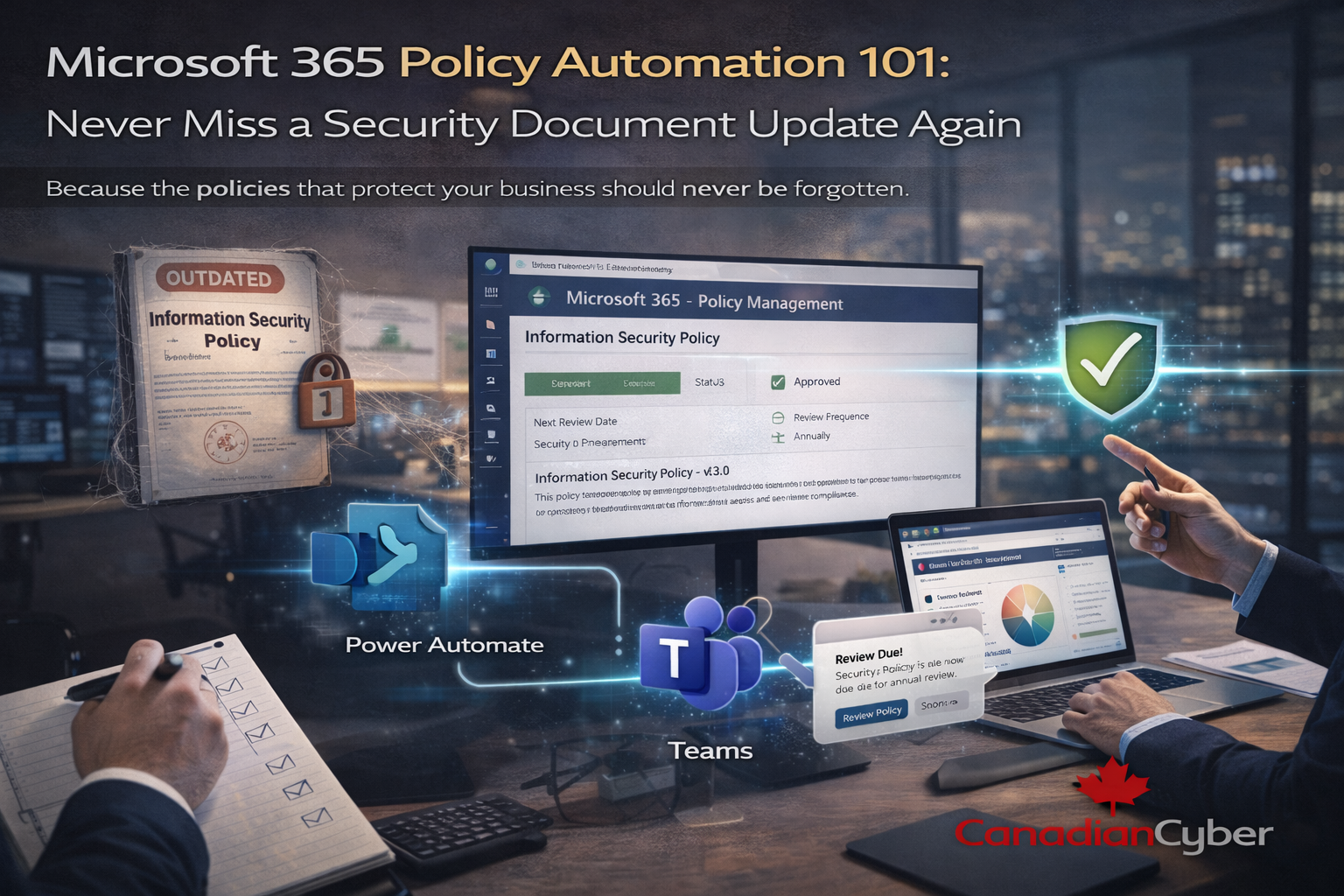
Microsoft 365 already includes everything needed for strong policy governance: SharePoint for document control, Power Automate for workflows, Teams for collaboration, and audit logs for traceability.
The problem usually isn’t the tools. It’s the lack of structure.
The Canadian Cyber ISMS solution turns SharePoint into a living policy management system not a static library.
What Policy Automation Really Means
Policy automation does not remove human judgment.
It ensures the system remembers when people forget.
Simple definition: reviews happen on time, approvals are traceable, and nothing quietly expires.
Automation supports governance it doesn’t replace it.
How Policy Automation Works in the Canadian Cyber ISMS Solution
1) Centralized Policy Library (One Source of Truth)
All security policies and procedures live in one SharePoint library, including
ISO 27001 Annex A policies, ISO 27017 cloud security guidance, and ISO 27018 privacy policies.
- One authoritative version
- Built-in version history
- Controlled editing permissions
Result: no duplicates, no confusion, no “which file is correct?”
2) Automated Review Date Tracking
Each policy includes a review frequency (for example, annual), a next review date, and an assigned owner.
The ISMS solution tracks these fields automatically.
- No spreadsheets
- No manual calendars
- No guesswork
3) Power Automate Review Reminders
When a review is due, Power Automate triggers notifications with clear instructions and a direct link to the document.
The system reminds the right person before it becomes a risk.
- Email or Teams notifications
- Owner-based reminders
- On-time review cycles
4) Approval Workflows Through Microsoft Teams
After review, policies move through a formal approval workflow.
Approvers are notified in Teams, comments are captured, and approval or rejection is logged.
- Clear accountability
- Timestamped decisions
- Audit-ready approval trails
Bonus: no “approved via email” explanations ever again.
5) Automatic Version Control and Audit Trail
Every update creates a new version, preserves the old one, and records who changed what and when.
Auditors don’t need stories. They need proof and it’s already there.
Why This Matters for ISO 27001 and Cloud Security
ISO frameworks expect regular review, documented approval, and evidence of governance.
Automated policy management reduces findings and builds confidence with auditors and regulators.
Most importantly: your policies reflect reality, not history.
A Fictional Example: From Policy Panic to Policy Confidence
(This example is fictional but reflects real-world experiences.)
An organization faced an ISO audit. Auditors asked:
“When was this policy last reviewed?” and “Who approved it?”
The answers were unclear.
After deploying the Canadian Cyber ISMS solution, review cycles were automated, approvals happened in Teams,
and evidence was always available. The next audit felt calm, controlled, and confident.
Why Automation Frees People to Focus on Security
Policy automation doesn’t remove responsibility. It removes mental overhead.
Teams stop worrying about missed deadlines, lost versions, and audit surprises.
You stop chasing
- Review deadlines
- Approval proof
- Correct document versions
You focus on improvement
- Stronger controls
- Better training
- Lower real-world risk
How Canadian Cyber Helps You Get There
We don’t just give you a SharePoint site. We give you a policy governance system that stays alive.
What you get with our ISMS solution
| Capability | Outcome |
|---|---|
| ISMS Solution Deployment | Structured libraries, review cycles, Teams approvals |
| Framework Alignment | ISO 27001, ISO 27017, ISO 27018, SOC 2 |
| Optional vCISO Oversight | Policy review guidance, governance maturity, continuous improvement |
Security Policies Should Support You — Not Stress You
Outdated policies don’t fail loudly. They fail silently.
Microsoft 365 policy automation ensures nothing is forgotten, governance is visible, and trust is maintained.
When policies stay current, security feels lighter.
Ready to Automate Policy Management in Microsoft 365?
Let us show you how security documentation can stay relevant and audit-ready without spreadsheets, reminders, or stress.
Stay Connected With Canadian Cyber
Follow Canadian Cyber for ISO 27001, SOC 2, and Microsoft 365 compliance insights: