SharePoint ISMS • Audit Evidence • ISO 27001 • SOC 2 • Documentation Control
SharePoint Evidence Naming Rules: How to Make Auditors Trust Your Documentation Faster
Auditors do not only review whether evidence exists. They also review whether evidence is clear, current, traceable, complete, and easy to connect to the control being tested.
Canadian Cyber ISMS SharePoint Solution
Build an Auditor-Ready Evidence Library Inside Microsoft 365
Canadian Cyber helps organizations manage policies, risks, controls, evidence, owners, review dates, workflows, dashboards, and auditor-ready documentation inside Microsoft 365 with a structured SharePoint ISMS.
Quick Answer
SharePoint evidence naming rules help auditors trust documentation faster by making each file clear, traceable, and easy to connect to a control, system, owner, and review period.
Good evidence names should include the framework or control reference, evidence type, system or process, date or review period, owner, and version or status where needed.
Practical takeaway: In a SharePoint ISMS, naming rules should be supported by metadata, document libraries, version control, approval workflows, permissions, dashboards, and auditor-ready views.
Quick Snapshot
| Evidence Problem | Better SharePoint Naming Practice |
|---|---|
| Vague file names | Include control, system, evidence type, owner, and period. |
| Missing dates | Add review period or evidence date. |
| No control mapping | Include control ID or use SharePoint metadata. |
| Duplicate files | Use version control and naming standards. |
| Unclear ownership | Include owner fields in metadata. |
| Unsafe client sharing | Label evidence as internal, auditor-ready, or client-ready. |
Why Evidence Naming Matters in an Audit
Evidence quality can directly affect audit speed and trust. A file called Screenshot1.png does not build confidence. A folder called Audit Stuff does not help the auditor. A spreadsheet called Final_FINAL_Updated_New.xlsx creates doubt.
In ISO 27001, SOC 2, ISO 42001, ISO 27017, ISO 27018, cyber insurance readiness, and customer security reviews, good evidence naming helps auditors understand what the file is, which control it supports, which system it relates to, who owns it, what period it covers, whether it is current, whether it is approved, and whether it is safe to share.
Auditors trust evidence faster when the file name, metadata, and folder location tell the same story.
Who This Guide Is For
- Companies preparing for ISO 27001 certification.
- SaaS companies preparing for SOC 2 audits.
- Organizations building a SharePoint ISMS.
- Compliance leads managing audit evidence.
- CTOs and IT managers responsible for access reviews and technical evidence.
- vCISO teams supporting client audit readiness.
- AI companies preparing ISO 42001 governance evidence.
- Sales teams answering customer security questionnaires.
Evidence Storage vs Evidence Management
Many organizations store evidence. Fewer organizations manage evidence.
| Evidence Storage | Evidence Management |
|---|---|
| Files are placed somewhere. | Evidence is controlled, named, mapped, reviewed, and retrievable. |
| Screenshots, exports, and reports are saved in folders. | Evidence has metadata, owners, review dates, control mapping, and status. |
| Files may be hard to locate during audit week. | Auditor-ready views show evidence by control, owner, framework, and period. |
Practical rule: A SharePoint folder can store files. A SharePoint ISMS manages audit evidence.
What Makes a Good Evidence File Name?
A good evidence file name should answer five basic questions: what is it, what does it relate to, when is it from, who owns it, and whether it is final or approved.
| Question | File Name Should Show |
|---|---|
| What is it? | Evidence type. |
| What does it relate to? | System, process, control, or framework. |
| When is it from? | Date, month, quarter, or year. |
| Who owns it? | Owner or responsible team. |
| Is it final? | Version, approval status, or final marker. |
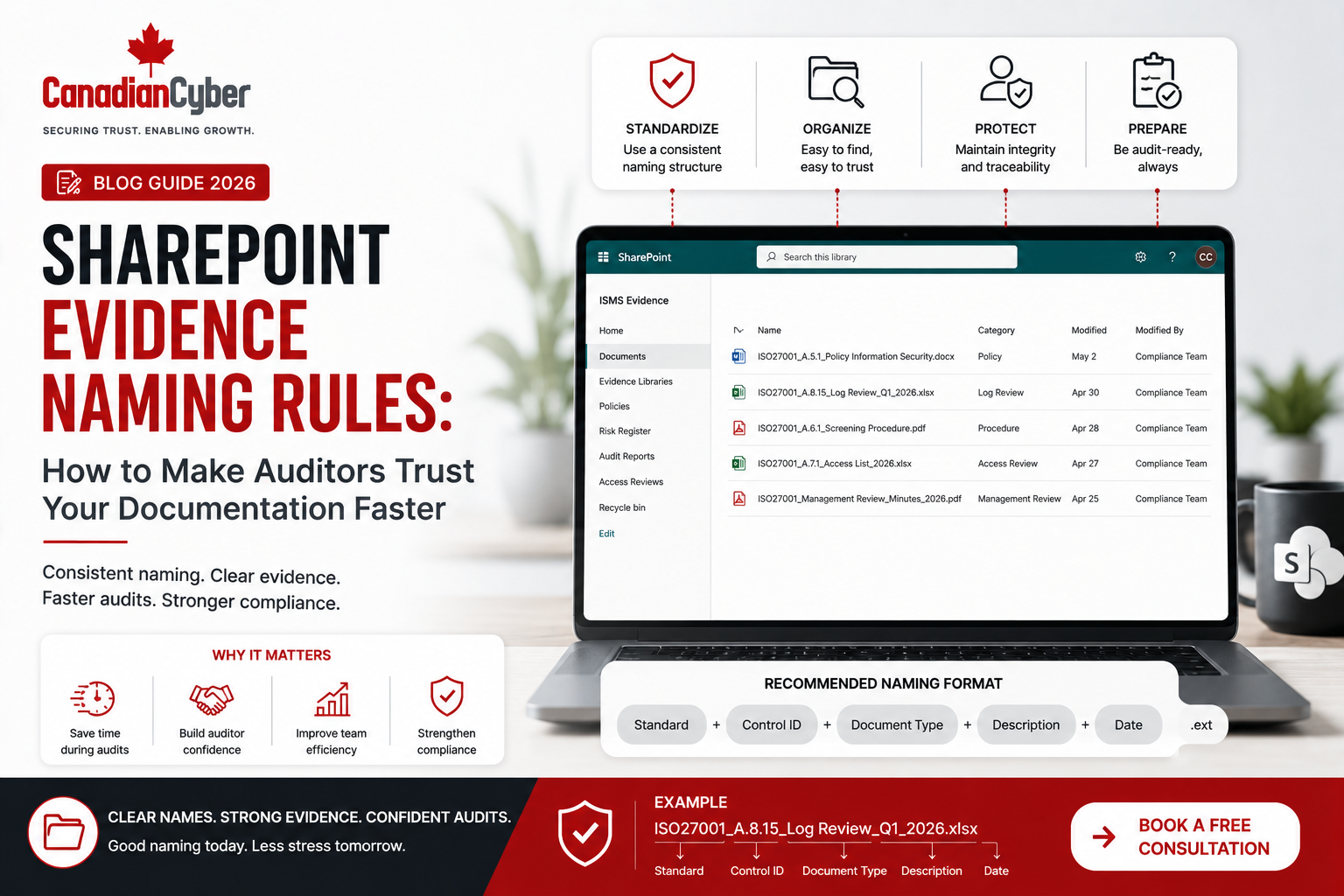
Simple Evidence Naming Formula
Framework-ControlID_EvidenceType_SystemOrProcess_Period_Owner_Status
Example: ISO27001-A5.15_AccessReview_Microsoft365_Q1-2026_IT-Final
Recommended SharePoint Evidence Naming Rules
Rule 1: Include the Framework or Control Reference
Evidence should be linked to a framework or control, such as ISO27001-A5.15, SOC2-CC6.1, ISO42001-AI-Risk, ISO27017-CloudAccess, or ISO27018-PII-Support.
Rule 2: Include the Evidence Type
The file name should show what type of evidence it is, such as AccessReview, MFAReport, BackupReport, RestoreTest, VendorReview, PolicyApproval, TrainingRecord, IncidentLog, RiskReview, AuditFinding, CorrectiveAction, ManagementReview, or VulnerabilityScan.
Rule 3: Include the System or Process Name
Many controls apply to multiple systems. An access review for Microsoft 365 is not the same as an access review for production cloud infrastructure. Include names such as Microsoft365, EntraID, Azure, AWS, GitHub, Jira, Salesforce, ProductionDatabase, SupportPlatform, HRSystem, BackupPlatform, or AIChatbot.
Rule 4: Include the Evidence Period
Recurring evidence should show the period it covers, such as Jan-2026, Q1-2026, 2026-Annual, 2026-07-15, H1-2026, or FY2026.
Rule 5: Include Status Where Useful
Status helps separate drafts from approved evidence. Use labels such as Draft, Submitted, Reviewed, Approved, Final, Archived, ClientReady, AuditorReady, or InternalOnly.
Need Auditor-Ready Evidence Naming Rules?
Canadian Cyber helps organizations build structured SharePoint ISMS workspaces where evidence is named, mapped, reviewed, approved, and ready for audit. For senior advisory support, you can also view Waqar Mehboob’s profile.
Better Evidence Naming Examples
| Evidence Type | Weak Name | Better Name |
|---|---|---|
| Access Review | access.xlsx |
ISO27001-A5.15_AccessReview_EntraID_Q2-2026_IT-Final.xlsx |
| MFA Evidence | mfa.png |
SOC2-CC6.1_MFAReport_Microsoft365_Jun-2026_IT-Reviewed.png |
| Vendor Review | vendor.pdf |
ISO27001-A5.19_VendorReview_Azure_2026-Annual_Compliance-Approved.pdf |
| Backup Evidence | backup report.pdf |
ISO27001-A8.13_BackupReport_ProductionDB_Q1-2026_IT-Final.pdf |
| Training Record | training.xlsx |
ISO27001-A6.3_TrainingRecord_AllStaff_2026-Annual_HR-Final.xlsx |
| Management Review | meeting minutes.docx |
ISO27001-Clause9.3_ManagementReview_Q2-2026_Leadership-Approved.docx |
| AI Governance | ai review.xlsx |
ISO42001_AIReview_CopilotUseCase_2026-Annual_AIGovernance-Approved.xlsx |
SharePoint Metadata Is Even More Powerful Than File Names
File names are important, but metadata makes SharePoint stronger. Instead of relying only on long file names, a SharePoint ISMS should use columns and views.
| Metadata Field | Purpose |
|---|---|
| Framework | ISO 27001, SOC 2, ISO 42001, ISO 27017, ISO 27018. |
| Control ID | Links evidence to requirement. |
| Evidence Type | Access review, backup report, vendor review, training record. |
| System or Process | Microsoft 365, Azure, HR, support platform, production database. |
| Evidence Owner | Person or team responsible. |
| Review Period | Month, quarter, year, or event. |
| Status | Missing, submitted, reviewed, approved, expired. |
| Confidentiality | Internal, restricted, auditor-ready, client-ready. |
| Expiry Date | Shows when evidence becomes stale. |
Practical rule: Use file names for clarity and metadata for audit filtering.
Recommended SharePoint Evidence Library Views
| View | Purpose |
|---|---|
| Evidence by Control | Shows all evidence mapped to a control. |
| Evidence by Framework | Shows ISO 27001, SOC 2, and ISO 42001 evidence separately. |
| Evidence by Owner | Helps control owners manage assigned evidence. |
| Missing Evidence | Shows gaps before the audit. |
| Overdue Evidence | Shows items past due. |
| Auditor-Ready Evidence | Shows approved evidence for external audit. |
| Client-Ready Evidence | Shows approved evidence for customers. |
| Management Review Evidence | Shows evidence for leadership review. |
Evidence Naming for Different Frameworks
| Framework | Example Naming Style |
|---|---|
| ISO 27001 | ISO27001-A5.16_IdentityManagementReview_EntraID_Q2-2026_IT-Final |
| SOC 2 | SOC2-CC6.6_AccessRemovalReview_HRLeavers_Q2-2026_IT-Reviewed |
| ISO 42001 | ISO42001_AIImpactAssessment_CustomerSupportAI_2026-Annual_Product-Approved |
| ISO 27017 | ISO27017_CloudAdminAccessReview_Azure_Q2-2026_IT-Final |
| ISO 27018 | ISO27018_SupportTicketPIIReview_Zendesk_Q2-2026_Privacy-Reviewed |
Evidence Naming for Client-Ready Packs
Not all evidence should be shared with customers. Some evidence is internal only. Some can be shared with auditors. Some can be shared with customers under NDA.
AuditorReady
ClientReady
NDARequired
Restricted
Redacted
Practical rule: Label evidence for sharing level before sales asks for it.
Power Automate Can Enforce Evidence Naming Discipline
Do not rely only on people remembering naming rules. Build reminders and review gates into the process.
| Workflow | How It Helps |
|---|---|
| Evidence Submission Workflow | Requests required metadata before upload. |
| Missing Metadata Alert | Notifies owner when required fields are blank. |
| Evidence Review Workflow | Routes submitted evidence for approval. |
| Expiry Reminder | Alerts owner before evidence becomes stale. |
| Overdue Evidence Escalation | Escalates late evidence to manager or compliance lead. |
| Client-Ready Approval | Routes external evidence for legal and compliance approval. |
Practical Checklist: SharePoint Evidence Naming Rules
| Action Item | Done? |
|---|---|
| Define a standard evidence naming formula. | |
| Include framework or control reference. | |
| Include evidence type. | |
| Include system or process name. | |
| Include date or review period. | |
| Include owner or responsible team. | |
| Use SharePoint metadata fields. | |
| Create auditor-ready views. | |
| Create client-ready views. | |
| Use Power Automate reminders. | |
| Train control owners on naming rules. |
Common Mistakes to Avoid
- Naming files based on convenience. Names like “new report,” “final,” “audit,” and “screenshot” are not enough.
- No control mapping. Evidence without a control reference creates extra audit work.
- No date or period. Auditors need to know whether evidence is current and whether it covers the audit period.
- Using only folders. Folders help, but metadata and views make evidence easier to filter and reuse.
- Mixing draft and final evidence. Drafts, reviewed files, approved files, and archived files should be clearly separated.
- No client-sharing label. Sales should not guess which evidence can be shared externally.
- No expiry dates. Vendor reports, policies, access reviews, penetration test summaries, and training records can become stale.
- No ownership. If nobody owns evidence, nobody updates it.
How Canadian Cyber Helps
Canadian Cyber helps organizations build auditor-ready evidence systems inside Microsoft 365. Our ISMS SharePoint Solution helps companies move from messy folders and last-minute audit searches to structured evidence management.
Canadian Cyber’s ISMS SharePoint Solution can include:
Canadian Cyber can support:
Canadian Cyber’s ISMS SharePoint Solution helps organizations make evidence easier to find, easier to trust, and easier to present.
Senior Advisory Support
For organizations that need senior guidance around SharePoint ISMS design, audit evidence naming rules, ISO 27001 implementation, SOC 2 readiness, vCISO oversight, evidence governance, and cybersecurity documentation control, Canadian Cyber also provides advisory support.
Frequently Asked Questions
Why do evidence naming rules matter for ISO 27001?
Evidence naming rules matter because auditors need to connect evidence to ISO 27001 clauses, Annex A controls, owners, dates, and review periods. Clear naming reduces confusion and speeds up audit review.
What is a good audit evidence file name?
A good audit evidence file name includes the framework or control ID, evidence type, system or process, date or period, owner, and status. For example: ISO27001-A5.15_AccessReview_EntraID_Q2-2026_IT-Final.
Should SharePoint evidence use folders or metadata?
Use both carefully, but metadata is more powerful. Folders provide structure, while metadata allows filtering by framework, control, owner, period, status, and confidentiality.
Can SharePoint help manage audit evidence?
Yes. A structured SharePoint ISMS can manage evidence libraries, metadata, control mappings, review dates, owners, approvals, dashboards, and auditor-ready views.
Does Canadian Cyber have a SharePoint ISMS solution?
Yes. Canadian Cyber has an ISMS SharePoint Solution that helps organizations manage policies, risks, controls, evidence, audits, corrective actions, workflows, dashboards, and client-ready evidence inside Microsoft 365.
Can evidence naming help with security questionnaires?
Yes. Clear naming and client-ready evidence labels help sales, security, legal, and compliance teams respond to security questionnaires faster and more consistently.
Takeaway
Evidence naming may seem small, but it has a major impact on audit trust.
Auditors trust documentation faster when evidence is clear, current, mapped, owned, and easy to retrieve. Strong evidence naming rules help your team avoid confusion, reduce audit follow-ups, improve security questionnaire responses, and build confidence with customers.
The best approach is to combine clear file names, SharePoint metadata, control mapping, review dates, approval workflows, auditor-ready views, client-ready labels, and Power Automate reminders.
Is Your Audit Evidence Scattered, Poorly Named, or Difficult to Trust?
Canadian Cyber can help you build evidence naming rules, metadata standards, workflows, dashboards, auditor-ready views, and client-ready evidence packs inside Microsoft 365. You can also learn more about senior advisory support through Waqar Mehboob’s profile.
Stay Connected With Canadian Cyber
Follow Canadian Cyber for practical guidance on SharePoint evidence management, ISO 27001, SOC 2, ISO 42001, ISO 27017, ISO 27018, audit documentation, internal audits, cybersecurity assessments, and vCISO support.