



ISO 42001 • SaaS AI Governance • AI Features • Compliance Risk • Responsible AI
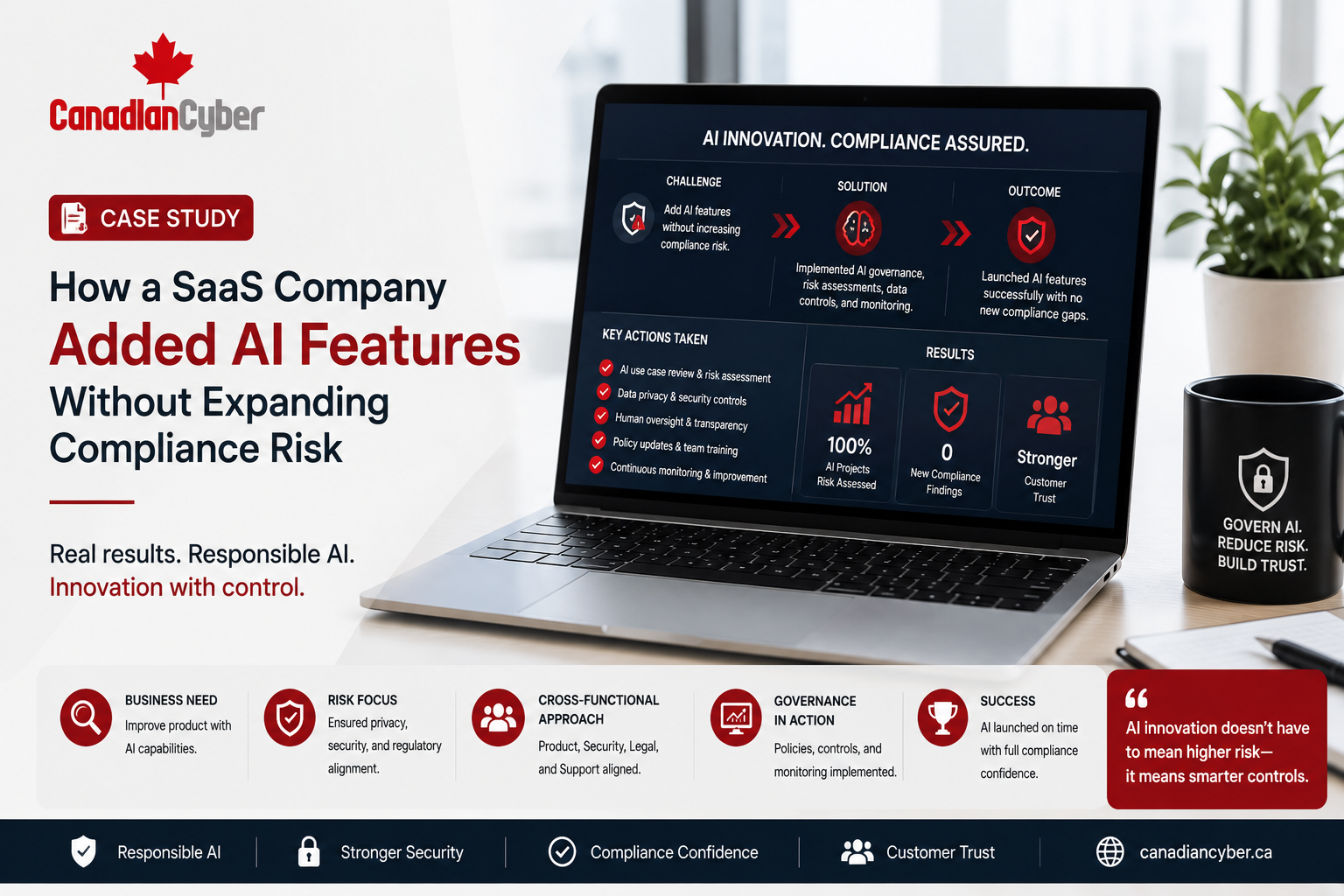
Case Study: How a SaaS Company Added AI Features Without Expanding Compliance Risk
SaaS companies are adding AI features to improve automation, reporting, document analysis, customer support, search, recommendations, and workflow intelligence. But AI can expand compliance risk if it is launched without governance.
Canadian Cyber ISO 42001 AI Governance Support
Add AI Features Without Creating Unmanaged Compliance Risk
Canadian Cyber helps SaaS companies build ISO 42001-ready AI governance programs, AI inventories, risk registers, impact assessments, vendor AI reviews, customer data rules, human oversight controls, and SharePoint AI governance workspaces.
Quick Snapshot
| Case Study Area | What Improved |
|---|---|
| Business Context | SaaS company adding AI features to an existing product. |
| Main Concern | AI could increase privacy, security, accuracy, vendor, and customer trust risk. |
| Governance Approach | AI inventory, risk register, impact assessments, vendor reviews, and launch controls. |
| Evidence System | SharePoint AI governance workspace linked to risks, features, owners, and approvals. |
| Business Outcome | Faster AI launch, lower compliance risk, stronger customer confidence, and better ISO 42001 readiness. |
Introduction
AI features can help SaaS companies grow faster. They can improve customer support, document review, workflow automation, search, analytics, risk scoring, reporting, recommendations, data extraction, customer insights, ticket classification, knowledge management, and decision support.
But AI features can also create new risks. An AI summary may be wrong. An AI recommendation may be biased. A chatbot may provide unsupported guidance. A vendor AI tool may process customer data. Customer files may be used in prompts. Outputs may be stored in logs. Support teams may rely on AI-generated answers.
This fictional case study explains how a SaaS company added AI features without expanding compliance risk. The company did not stop innovation. It added structure before launch.
AI should not be blocked by compliance, but AI should not bypass compliance either.
Need to Add AI Features Without Expanding Compliance Risk?
Canadian Cyber helps SaaS companies design practical AI governance before launch, including ISO 42001 readiness, AI risk assessments, vendor reviews, data rules, human oversight, and SharePoint evidence workspaces.
Meet the SaaS Company
Let’s call the company TaskPilot Cloud.
TaskPilot Cloud was a growing SaaS company that helped business teams manage workflow approvals, documents, tasks, and customer requests. The company wanted to add AI features to improve productivity and customer experience.
Planned AI Features
| AI Feature | Purpose |
|---|---|
| AI Document Summary | Summarize uploaded business documents. |
| AI Support Assistant | Draft suggested support replies. |
| AI Workflow Recommendation | Suggest next steps based on task history. |
| AI Search | Help users find policies, files, and previous decisions. |
| AI Risk Flag | Highlight unusual or incomplete workflow items. |
The product team wanted to launch quickly. The compliance lead wanted to avoid risk. The sales team wanted customer-ready AI governance answers. Leadership wanted innovation without creating audit problems.
The Starting Concern
TaskPilot Cloud already had security and compliance work in progress. The company was preparing for SOC 2 and considering ISO 27001. It also wanted to build toward ISO 42001 readiness because customers were asking about responsible AI.
| Main Compliance Concern | Why It Mattered |
|---|---|
| Customer Data Use | AI features might process uploaded files and workflow metadata. |
| Vendor AI Risk | Third-party AI providers might retain prompts or use data for training. |
| Accuracy | AI outputs could be incomplete or misleading. |
| Human Oversight | Users might rely on AI suggestions without review. |
| Privacy | Personal information could appear in prompts, logs, or outputs. |
| Security | Prompt injection or data leakage could affect customer trust. |
| Evidence | The company needed proof that AI features were reviewed before launch. |
AI compliance risk grows when teams cannot explain what the AI does, what data it uses, and how it is controlled.
Step 1: Creating an AI Feature Inventory
The first step was simple. TaskPilot Cloud created an AI inventory. This made planned AI features visible to leadership, product, security, legal, support, and compliance teams.
| AI Inventory Field | Purpose |
|---|---|
| AI Feature Name | Identifies the feature. |
| Product Area | Shows where the feature appears. |
| Use Case | Defines what the AI does. |
| Business Owner | Assigns product accountability. |
| Technical Owner | Assigns engineering responsibility. |
| AI Vendor | Identifies internal model or third-party provider. |
| Data Used | Lists customer files, metadata, logs, or public data. |
| Evidence Link | Links to risk review, vendor review, and approval records. |
The company discovered that not all AI features had the same risk. AI Support Assistant was lower risk because it only drafted internal suggestions. AI Document Summary was higher risk because it processed customer-uploaded files. AI Workflow Recommendation was higher risk because users might rely on it for business decisions.
Step 2: Separating Low-Risk and High-Risk AI Use Cases
The company did not apply the same level of control to every AI feature. Instead, it created risk tiers.
| Tier | Example | Required Governance |
|---|---|---|
| Low Risk | Internal support draft with no customer data. | Basic review and approved tool use. |
| Medium Risk | AI search over approved customer workspace content. | Data access review and monitoring. |
| High Risk | AI recommendation affecting customer workflow decisions. | Risk assessment, impact assessment, human oversight, and approval. |
Not every AI feature needs the same review, but every AI feature needs some review.
Step 3: Defining Approved AI Use Cases
Each AI feature received a documented approved use case. This prevented product teams, support teams, and customers from treating AI outputs as more authoritative than they were.
| Example: AI Document Summary | Approved Rule |
|---|---|
| Approved Use | Summarize uploaded documents for user convenience. |
| Prohibited Use | Replace legal, financial, HR, or compliance review. |
| Data Allowed | Customer-uploaded documents within the platform. |
| Data Not Allowed | Secrets, passwords, or unrelated personal data. |
| Human Review | Required before using the summary for important business decisions. |
| Monitoring | Track incorrect summary reports and support escalations. |
Start With AI Visibility and Risk Tiering
Canadian Cyber helps SaaS teams create AI inventories, risk tiers, approved use cases, prohibited use rules, ownership models, and launch evidence for ISO 42001 readiness.
Step 4: Completing AI Risk Assessments
TaskPilot Cloud completed AI risk assessments for each planned feature. The reviews focused on purpose, data use, customer impact, accuracy, fairness, vendor involvement, human oversight, and issue tracking.
| Risk Assessment Question | Why It Mattered |
|---|---|
| What does the AI feature do? | Defines scope. |
| What data does it process? | Identifies privacy and confidentiality risk. |
| Could output affect customer decisions? | Defines impact. |
| Could output be wrong or incomplete? | Identifies accuracy risk. |
| Could output be biased? | Identifies fairness risk. |
| How will issues be tracked? | Supports monitoring. |
Step 5: Completing AI Impact Assessments
For higher-risk features, the company completed AI impact assessments. The purpose was to understand how each AI feature could affect customers, privacy, confidentiality, security, fairness, transparency, operations, and support.
| Impact Area | Review Focus |
|---|---|
| Customer Impact | Could the AI influence customer action? |
| Privacy Impact | Does it process personal information? |
| Confidentiality Impact | Does it process customer files or sensitive records? |
| Security Impact | Could prompts or outputs expose data? |
| Fairness Impact | Could outputs affect users unevenly? |
| Support Impact | Can support explain and escalate AI issues? |
AI Workflow Recommendation was approved only after adding clearer user notices and human confirmation before acting on the recommendation.
Step 6: Reviewing AI Vendors
TaskPilot Cloud used a third-party AI provider. That meant vendor review was required before customer data could be processed.
| AI Vendor Review Evidence | Status |
|---|---|
| Vendor service description | Completed |
| Data processed by vendor | Completed |
| Contract and DPA | Completed |
| Data training terms | Reviewed |
| Prompt and output retention | Reviewed |
| Subprocessor list | Collected |
| Security assurance evidence | Collected |
| Vendor risk rating | Completed |
The company selected a configuration where customer data would not be used for model training.
Step 7: Creating Customer Data Rules
The team documented what customer data could and could not be used in AI workflows.
| Customer Data Rule | Purpose |
|---|---|
| Do not enter secrets, passwords, or credentials | Prevents security exposure. |
| Do not use customer data in unapproved AI tools | Prevents shadow AI risk. |
| Do not use customer data for training without approval | Protects customer trust. |
| Minimize prompts to required context | Reduces unnecessary exposure. |
| Mask sensitive fields where practical | Reduces privacy risk. |
| Restrict access to AI logs | Protects confidentiality. |
AI Vendor and Customer Data Rules Need Evidence
Canadian Cyber helps SaaS teams review AI vendors, data training terms, retention, subprocessors, customer data use, prompt logging, and privacy controls before AI features launch.
Step 8: Defining Human Oversight
Human oversight was required for higher-impact AI outputs. The company built oversight into product workflows instead of relying on a vague policy statement.
| AI Feature | Human Oversight Rule |
|---|---|
| AI Document Summary | User must verify before relying on summary. |
| AI Support Assistant | Support agent reviews before sending. |
| AI Workflow Recommendation | User confirms before action is taken. |
| AI Risk Flag | Product displays as suggestion, not final decision. |
| AI Search | User can view source content where possible. |
Step 9: Updating Product Launch Readiness
The AI launch checklist was added to the product release process. No AI feature could launch until product, legal, security, privacy, support, and compliance readiness were complete.
| Area | Approval Needed |
|---|---|
| Product | Use case, customer impact, user notice. |
| Legal | Terms, privacy, vendor contract. |
| Security | Data flow, access, prompt security, logging. |
| Privacy | Personal data, retention, deletion. |
| Support | FAQ, escalation, AI issue handling. |
| Compliance | Risk assessment, impact assessment, evidence. |
Step 10: Preparing Support Teams
Support teams needed to be ready for customer questions about AI behavior, trust, training, disablement, errors, and escalation.
customer explanation script
AI limitation guidance
AI error reporting category
escalation process
privacy-safe troubleshooting
support access review
AI support training
Step 11: Creating an AI Issue Tracker
The company created an AI issue tracker for post-launch monitoring. This helped teams track errors, complaints, bias concerns, vendor issues, security concerns, privacy concerns, and human overrides.
| AI Issue Tracker Field | Purpose |
|---|---|
| Issue ID | Unique reference. |
| AI Feature | Feature affected. |
| Issue Type | Error, privacy, security, bias, or complaint. |
| Severity | High, medium, or low. |
| Owner | Responsible person. |
| Corrective Action | Fix or improvement. |
| Evidence Link | Supporting record. |
Step 12: Building a SharePoint AI Governance Workspace
Canadian Cyber helped the company organize AI governance evidence in SharePoint. The workspace connected AI features, risks, vendors, impact assessments, launch approvals, human oversight, policies, issue tracking, and management dashboards.
| SharePoint Workspace Section | Purpose |
|---|---|
| AI Inventory | Lists AI features, owners, risk levels, and launch status. |
| AI Risk Register | Tracks AI risks and treatment plans. |
| AI Impact Assessments | Stores feature impact reviews. |
| AI Vendor Register | Tracks vendors, contracts, assurance, and data terms. |
| AI Launch Evidence | Stores approvals, testing, privacy, and security reviews. |
| Human Oversight Evidence | Stores review rules and approval records. |
| AI Issue Tracker | Tracks errors, complaints, bias, misuse, and incidents. |
| Management Dashboard | Shows launch status, risks, and overdue actions. |
Build a SharePoint AI Governance Workspace
Canadian Cyber helps SaaS companies build SharePoint AI governance workspaces for ISO 42001 readiness, AI product launch controls, AI risk management, vendor reviews, human oversight, and customer-ready evidence.
Results
TaskPilot Cloud launched AI features without creating unmanaged compliance risk.
| Before | After |
|---|---|
| AI features planned informally | AI inventory created. |
| Vendor terms unclear | AI vendor review completed. |
| Customer data rules undefined | AI data use rules documented. |
| Human review inconsistent | Oversight requirements defined. |
| Product launch checklist lacked AI controls | AI release readiness added. |
| Support team unprepared | AI support guidance created. |
| No AI issue tracking | AI issue tracker launched. |
| Evidence scattered | SharePoint AI governance workspace created. |
The company gained:
clearer customer data governance
stronger vendor control
better support preparedness
reduced privacy and security risk
improved customer trust
better ISO 42001 readiness
stronger leadership visibility
Lessons for SaaS Companies Adding AI
| Lesson | Why It Matters |
|---|---|
| AI governance should start before launch. | Waiting until after launch creates avoidable risk. |
| Not all AI features carry the same risk. | Use risk-based review. |
| Vendor terms matter. | Customer data use, training terms, retention, and subprocessors must be reviewed. |
| Human oversight must be practical. | Oversight should be built into workflows. |
| Evidence builds trust. | SharePoint governance records help prove the AI feature was reviewed. |
AI Compliance Risk Reduction Checklist
Use this checklist before launching AI features.
| Area | Questions to Confirm | Yes / No |
|---|---|---|
| Governance | Is the AI feature in the AI inventory? Is an owner assigned? Is the approved use case documented? Are prohibited uses defined? | |
| Risk and Impact | Is an AI risk assessment complete? Is an impact assessment complete? Is customer impact reviewed? Is human oversight defined? | |
| Data and Vendor | Is customer data use documented? Is the AI vendor reviewed? Are training terms reviewed? Are retention and deletion terms clear? | |
| Support and Evidence | Is support trained? Is there an AI issue tracker? Are customer FAQs prepared? Is launch approval documented? Is evidence stored in SharePoint? |
Common Mistakes to Avoid
- Launching AI before governance. AI features should be reviewed before customer release.
- No AI inventory. Unknown AI features cannot be governed.
- Ignoring vendor training terms. Customer data should not be used for model training without proper review and approval.
- Treating AI output as always correct. AI outputs need limitations, testing, and human oversight.
- No support plan. Support teams need to understand how to handle AI questions and errors.
- No AI issue tracker. Post-launch issues need tracking and corrective action.
- No evidence. Without evidence, it is difficult to prove AI governance during client or ISO 42001 reviews.
What Good Looks Like
A SaaS company adding AI features without expanding compliance risk can show:
- AI feature inventory
- approved use cases
- prohibited use cases
- AI risk assessments
- AI impact assessments
- AI vendor reviews
- customer data rules
- human oversight requirements
- product launch approvals
- security reviews
- privacy reviews
- support readiness records
- AI issue tracker
- management review dashboard
- SharePoint AI governance workspace
- client-ready AI governance summary
This helps the company innovate while maintaining customer trust.
Canadian Cyber’s Take
At Canadian Cyber, we see SaaS companies excited to launch AI features quickly. That is understandable. AI can improve user experience, automation, productivity, and product value.
But unmanaged AI can create new compliance risk. The best SaaS companies do not treat AI governance as a blocker. They treat it as launch infrastructure.
They define ownership, review data use, assess risk, check vendors, prepare support, monitor issues, and keep evidence. That is how AI features can be launched with more confidence.
AI innovation and compliance do not need to conflict. With the right structure, they can support each other.
Takeaway
A SaaS company can add AI features without expanding compliance risk by putting governance in place before launch.
Focus on:
- AI inventory
- risk-based review
- impact assessments
- customer data rules
- vendor AI review
- human oversight
- support readiness
- AI issue tracking
- release approval evidence
- SharePoint governance workspace
How Canadian Cyber Can Help
Canadian Cyber helps SaaS companies add AI features with stronger governance and ISO 42001 readiness.
- ISO 42001 readiness assessments
- AI governance program design
- AI feature inventory creation
- AI risk register development
- AI impact assessments
- AI vendor reviews
- AI product launch controls
- customer data use reviews
- human oversight design
- AI support readiness planning
- AI issue tracker setup
- SharePoint AI governance workspace setup
- management review dashboards
- client-ready AI governance evidence packs
- vCISO and AI governance support
Stay Connected With Canadian Cyber
Follow Canadian Cyber for practical guidance on ISO 42001, SaaS AI governance, AI product launch controls, responsible AI, SharePoint ISMS, SOC 2, ISO 27001, ISO 27018, and vCISO support.










