
Get in touch
info@canadiancyber.ca


Rafia Rizwan

April 22, 2026
A practical guide to building an audit simulation workspace in SharePoint to rehearse evidence requests and improve audit readiness.
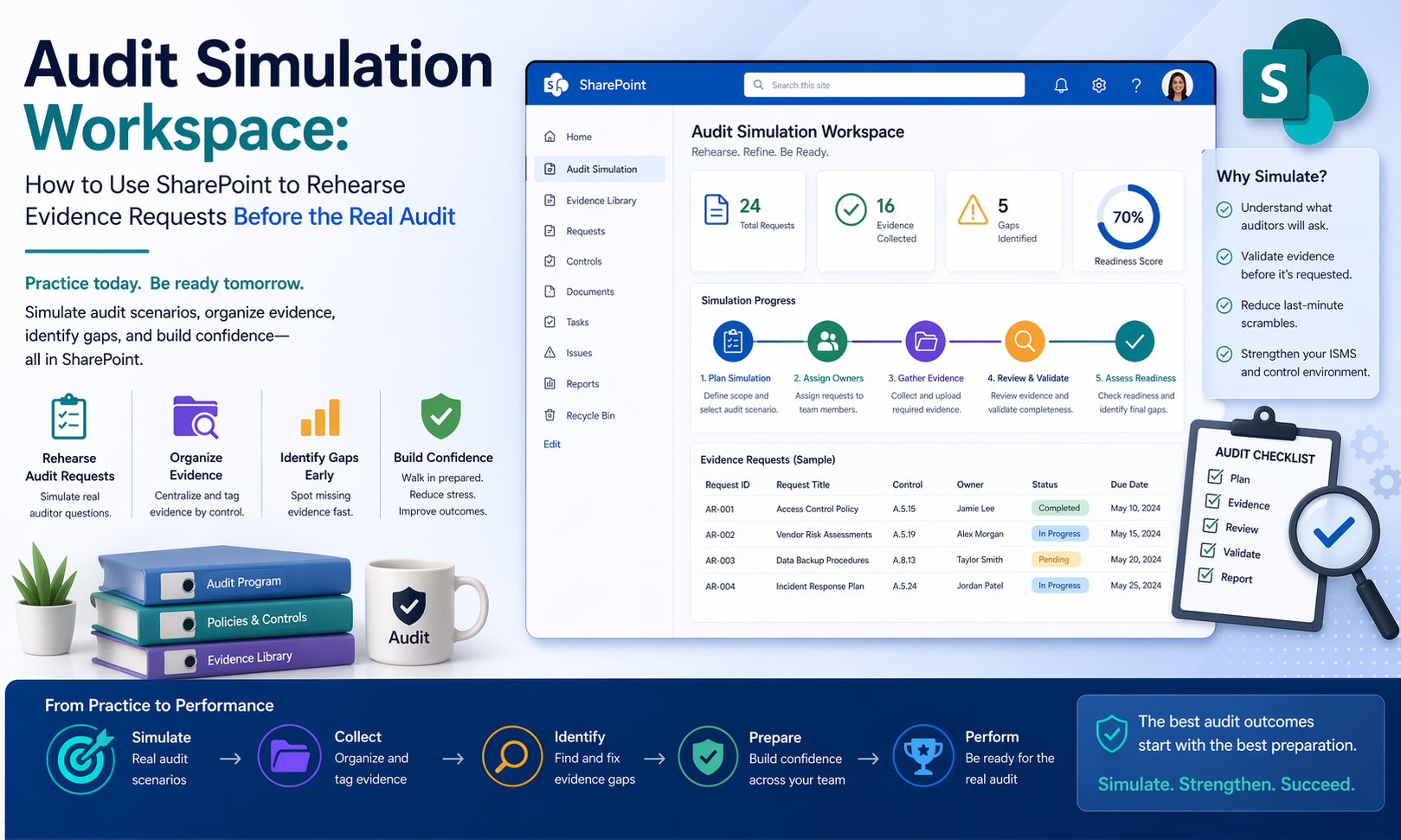
Someone asks for access review evidence. Another asks for incident records. Someone needs the latest approved policy. A control owner sends the wrong version. A screenshot is missing context. A report exists, but nobody is sure whether it covers the right period.
And suddenly the team is not proving controls. It is scrambling to reconstruct them.
This is exactly why an audit simulation workspace in SharePoint can be so valuable. Before the real audit begins, organizations can use SharePoint to rehearse the evidence-request experience in a controlled way.
In simpler terms, an audit simulation workspace helps turn audit prep from a last-minute hunt into a repeatable practice run. For ISO 27001, SOC 2, internal audits, customer due diligence, and surveillance reviews, that can make a huge difference.
A lot of organizations already have the right ingredients. They may already have policies, risk registers, vendor reviews, access review records, incident logs, corrective actions, training evidence, and management review notes.
But audit readiness still feels chaotic. Why? Because having evidence is not the same as being ready to produce it. The real problem usually sits in the gap between storage and retrieval.
That is why the real audit can feel harder than expected, even when the organization has done a lot of work.
An audit simulation workspace is not just another folder. It is a structured SharePoint area used to rehearse how the organization will respond to evidence requests before an actual audit, certification review, or customer assessment.
That usually means the workspace is used to test whether evidence is easy to locate, whether the evidence is current, whether it matches the control being tested, whether control owners know what to provide, whether the team can answer follow-up questions, whether the evidence package tells a clear story, and whether weak spots appear before the real auditor sees them.
Picture this. A company is six weeks away from an ISO 27001 surveillance audit. The compliance lead believes the team is in reasonably good shape. The organization already has a SharePoint policy library, a risk register, internal audit reports, corrective action trackers, incident records, vendor review files, and evidence folders by control area.
Everything appears to be there. Then the team runs a mock evidence exercise.
Now the value of the rehearsal becomes obvious. The problem was not that the organization had no evidence. The problem was that it had never practiced retrieving and defending it.
SharePoint is a strong fit for audit simulation because it can support controlled document libraries, metadata and tagging, list-based tracking, version history, permissions, filtered views, linked records, and dashboards and owner views.
That means it can do more than hold files. It can help the organization simulate the actual audit workflow: request, assignment, retrieval, review, response, follow-up, and gap identification.
A lot of audit prep focuses on document collection. That matters, but it is incomplete. A better goal is to rehearse the whole evidence experience.
That means asking questions like: If the auditor requested this control today, could we respond cleanly? Would the owner know where the evidence is? Would the evidence make sense to someone outside the team? Is the record current and complete? Would follow-up questions expose missing context? Could we prove the process operated, not just that a file exists?
This is where SharePoint becomes more than a repository. It becomes a rehearsal environment.
A practical SharePoint-based simulation workspace usually includes five core components: a mock request log, an evidence staging area, linked source records, owner and status tracking, and gap and observation capture.
This is the backbone of the simulation. A SharePoint list can be used to log mock audit requests in a structured way.
| Field | Why It Matters |
|---|---|
| Request ID | Supports tracking |
| Audit area / control | Shows what is being tested |
| Request description | Simulates real auditor wording |
| Request date | Supports response timing |
| Owner assigned | Clarifies responsibility |
| Status | Tracks progress |
| Due date | Simulates audit pressure |
| Evidence link | Connects the response |
| Reviewer comments | Captures feedback |
| Gap found? | Flags issues early |
This turns the simulation into a process, not just a file check.
During a real audit, teams often pull files from different libraries and try to assemble a coherent response. The simulation workspace should mimic that.
A SharePoint document library or controlled area can be used to stage copies or links for the mock evidence package. The key is not to create another uncontrolled duplicate archive. It is to create a working area where the team can test how evidence is presented, whether it is complete, and whether it makes sense together.
A strong simulation workspace should avoid becoming another disconnected evidence dump. Where possible, each simulated response should connect back to the source system or official record.
This matters because one of the most common audit weaknesses is proving that the file provided actually came from the governed system of record.
One of the most useful parts of a simulation is showing whether control owners can actually respond as expected. That means the workspace should track who owns the request, how long it took them to respond, whether they needed support, whether they provided complete evidence, and whether follow-up was required.
This gives the compliance lead visibility into more than document readiness. It also shows operational readiness.
This is where the simulation becomes high-value. Every mock request should create an opportunity to capture missing evidence, stale records, weak naming, lack of approval history, owner confusion, bad linkage to source records, incomplete closure notes, inconsistent formatting, unclear explanations, and missing review dates.
| Field | Why It Matters |
|---|---|
| Gap ID | Tracking and follow-up |
| Related request | Shows where it came from |
| Observation | Describes the issue clearly |
| Severity | Helps prioritize |
| Owner | Assigns responsibility |
| Corrective action needed | Moves from observation to remediation |
| Due date | Prevents drift |
| Status | Tracks closure |
This is what makes the simulation more than a dry run. It becomes a source of real improvement work.
Not every control needs to be simulated at once. A practical simulation usually starts with the evidence areas most likely to create trouble in the real audit.
Start with these, and the simulation will usually surface the most meaningful readiness gaps quickly.
A simulation should create useful pressure, not panic. A practical approach often looks like this:
| Step | What to Do |
|---|---|
| Step 1 | Pick 10 to 15 high-value mock requests |
| Step 2 | Use realistic request language |
| Step 3 | Assign them to real owners |
| Step 4 | Time the response |
| Step 5 | Review the evidence like an auditor would |
| Step 6 | Log observations and corrective actions |
This creates a controlled rehearsal without turning it into a massive exercise.
A strong audit simulation should produce more than a stack of files. It should leave the organization with a response-time picture, a quality picture, a readiness picture, a corrective action list, and a stronger owner experience.
This is what makes the rehearsal worth doing.
The simulation workspace usually reveals issues fast.
These are exactly the types of issues that feel manageable internally, then become stressful during the real audit.
You do not need an overly complex setup to make this work. The most useful SharePoint features for audit simulation are often structured request lists, metadata for audit area, owner, and status, document version history, filtered views by control area or owner, linked evidence libraries, permissions that keep the workspace controlled, dashboards for open requests and gaps, and comments or review fields for mock auditor feedback.
This is enough to create a practical simulation environment without building a giant new system.
An audit simulation workspace is not just useful for the compliance team. Leadership benefits because it gives a clearer view of where the audit risk really is, which teams are prepared, where control evidence is weak, what still needs remediation, whether external audit timing is realistic, and whether the organization is ready operationally, not just document-wise.
This makes audit readiness a management topic, not just a compliance scramble.
These six mistakes are what usually make simulations less effective than they could be.
At Canadian Cyber, we often see organizations assume they are audit-ready because the evidence technically exists somewhere in SharePoint. But readiness is not just about existence.
It is about whether the team can retrieve the right evidence quickly, explain why it matters, show it is current, and defend it under follow-up questions. That is why audit simulation is so valuable.
The strongest SharePoint-based audit prep usually includes structured mock requests, owner assignment, timed retrieval, evidence review, and gap capture tied to corrective action. That process turns SharePoint from a passive evidence store into a practical rehearsal space. And that is what reduces real audit stress.
An audit simulation workspace in SharePoint is one of the most practical ways to prepare for a real audit before external pressure arrives.
It helps organizations rehearse the part of audit readiness that often hurts the most: finding the right evidence, linking it to the right control, proving it is current, and responding in a way that makes sense to an auditor.
A strong simulation workspace usually includes a mock request log, an evidence staging area, links back to source records, owner and status tracking, and gap capture with corrective follow-up. Because in the end, the best time to discover evidence weaknesses is not during the real audit. It is when you still have time to fix them.










