



Power Automate • SharePoint ISMS • Compliance Automation • Audit Evidence • Microsoft 365
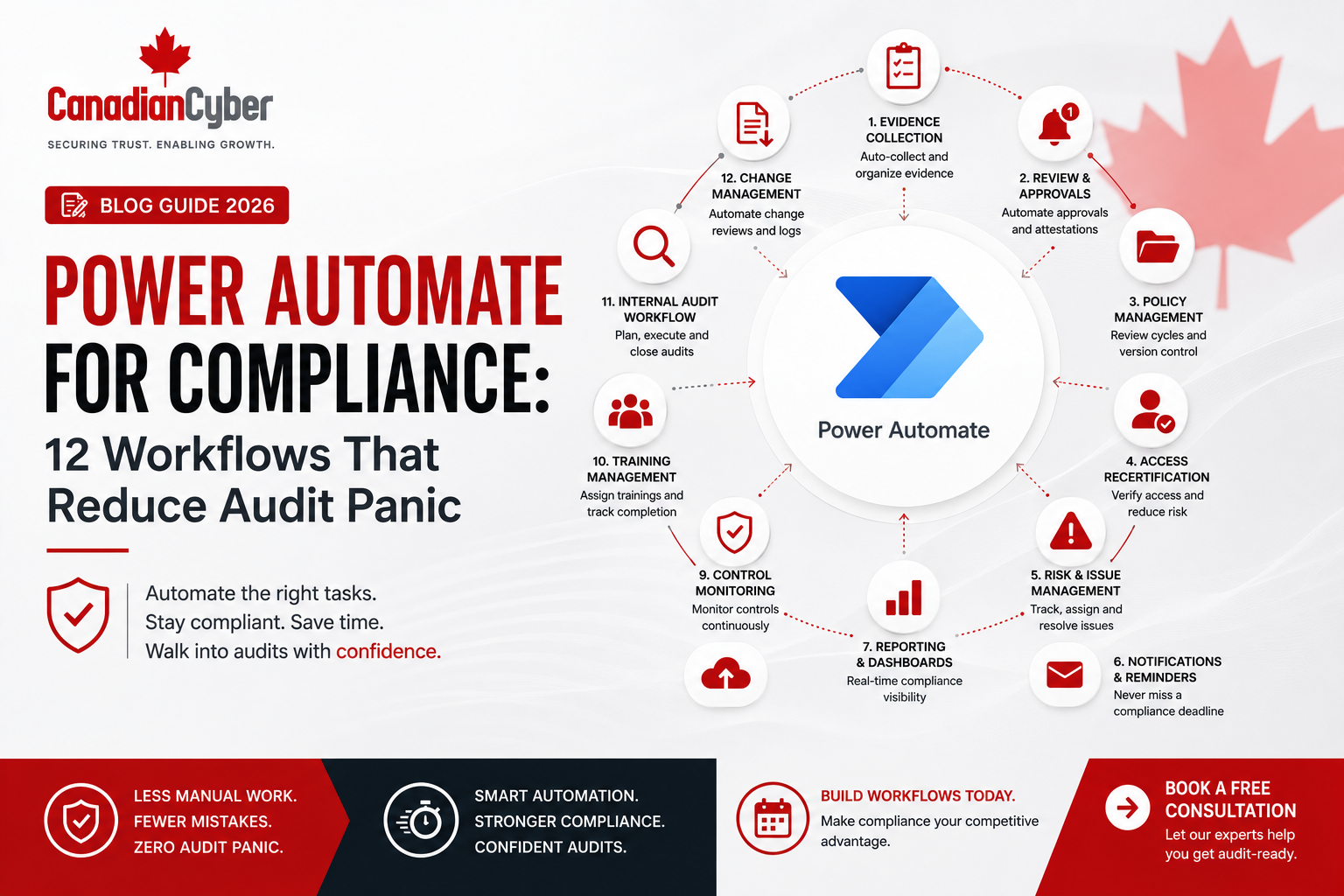
Power Automate for Compliance: 12 Workflows That Reduce Audit Panic
Audit panic usually starts when evidence is missing, owners are unsure, review dates are overdue, and compliance tasks depend on memory instead of repeatable workflows.
Canadian Cyber Microsoft 365 Compliance Automation
Turn Compliance Follow-Ups Into Automated Workflows
Canadian Cyber helps organizations design SharePoint ISMS workspaces and Power Automate workflows for ISO 27001, SOC 2, ISO 42001, ISO 27017, ISO 27018, internal audits, cyber insurance evidence, incident response, and vCISO reporting.
Quick Answer
Power Automate can reduce audit panic by automating recurring compliance tasks such as policy reviews, evidence reminders, access reviews, vendor reviews, corrective actions, incident response follow-ups, security training, and management review preparation.
When connected to SharePoint libraries, Microsoft Lists, Teams notifications, and approval workflows, Power Automate helps control owners know what is due, where to upload evidence, and when tasks are overdue.
Practical takeaway: Power Automate does not replace governance, but it makes compliance easier to operate consistently.
Quick Snapshot
| Workflow | What It Helps With |
|---|---|
| Policy Review Reminder | Prevents expired policies before audits. |
| Evidence Due Reminder | Notifies control owners before evidence is late. |
| Overdue Evidence Escalation | Alerts managers when evidence is not submitted. |
| Access Review Workflow | Tracks access review completion and exceptions. |
| Vendor Review Workflow | Keeps supplier reviews current. |
| Management Review Prep | Sends dashboard summaries before leadership meetings. |
Why Audit Panic Happens
Audit panic usually starts the same way. The auditor asks for evidence. The compliance lead checks the folder. The evidence is missing. The control owner says they did not know it was due. The policy review is overdue. The access review was completed but not saved. The vendor review is buried in email.
This is not always a security failure. It is often a workflow failure.
Compliance fails when tasks depend on memory. Power Automate helps turn memory-based compliance into workflow-based compliance.
For organizations using SharePoint, Teams, Microsoft Lists, and Microsoft 365, Power Automate can become a practical compliance automation layer for ISO 27001, SOC 2, ISO 42001, ISO 27017, ISO 27018, cyber insurance evidence, internal audits, incident response planning, cybersecurity assessments, and vCISO reporting.
Who This Guide Is For
- SaaS companies preparing for SOC 2 or ISO 27001.
- Canadian SMBs using Microsoft 365 for compliance.
- CTOs and IT managers responsible for audit readiness.
- Compliance leads managing evidence collection.
- Security leaders building a SharePoint ISMS.
- AI startups preparing ISO 42001 governance evidence.
- vCISO teams building recurring governance workflows.
What Is Power Automate for Compliance?
Power Automate for compliance means using Microsoft’s workflow automation tool to manage security, privacy, risk, audit, and evidence tasks. It can connect SharePoint document libraries, Microsoft Lists, Teams messages, Outlook emails, Planner tasks, Forms submissions, approval workflows, Excel tables, Power BI dashboards, and Microsoft 365 user actions.
In a SharePoint ISMS, Power Automate can support:
policy review
risk review
vendor review
access review
incident response
training reminders
corrective actions
audit preparation
management review
Practical rule: Power Automate should automate the process around compliance, not replace the judgment required for compliance.
12 Power Automate Workflows That Reduce Audit Panic
1. Policy Review Reminder Workflow
Policies often become outdated because nobody remembers the review date. A policy review workflow can automatically notify the policy owner before the review date arrives and escalate if the review is not completed.
2. Evidence Due Reminder Workflow
Evidence collection is one of the biggest audit pain points. This workflow reminds control owners when recurring evidence is due and links them to the correct SharePoint upload location.
3. Overdue Evidence Escalation Workflow
A reminder is useful, but escalation creates accountability. If evidence remains missing after the due date, managers, compliance leads, or vCISO teams can be notified before audit week.
4. Access Review Workflow
Access reviews are common in ISO 27001, SOC 2, cyber insurance, and enterprise customer reviews. Power Automate can support review scheduling, owner sign-off, exception tracking, and evidence storage.
5. Vendor Review Workflow
Vendor reviews often get missed because contracts, DPAs, SOC 2 reports, and assurance evidence are stored in different places. A vendor review workflow keeps supplier evidence current.
6. Corrective Action Workflow
Audit findings, cybersecurity assessment gaps, incident lessons, and tabletop actions need follow-up. Power Automate can remind owners, escalate overdue actions, and require closure evidence before completion.
7. Incident Response Notification Workflow
When an incident is reported, speed matters. Power Automate can create an incident register entry, notify response owners, assign tasks, and capture closure evidence.
8. Tabletop Exercise Workflow
Incident response plans should be tested. This workflow can schedule tabletop exercises, record attendance, capture lessons learned, create corrective actions, and store evidence.
9. Management Review Preparation Workflow
Management review should show decisions, not just attendance. Power Automate can collect dashboard inputs before the meeting and store the agenda, minutes, attendance, and action items afterward.
10. Security Training Reminder Workflow
Security awareness training is often requested by auditors, insurers, and customers. Power Automate can assign training, remind employees, notify managers, and store completion evidence.
11. AI Governance Review Workflow
As companies adopt AI tools and AI features, governance evidence becomes more important. Power Automate can route AI tool requests for security, privacy, legal, product, and vendor review.
12. Client Evidence Pack Workflow
SaaS companies often need to answer customer security questionnaires quickly. A client evidence pack workflow helps sales and customer success request approved evidence from the right source.
Practical Table: 12 Workflows and Their Compliance Value
| Workflow | Primary Benefit | Frameworks Supported |
|---|---|---|
| Policy Review Reminder | Keeps documents current. | ISO 27001, SOC 2, ISO 42001 |
| Evidence Due Reminder | Reduces missing evidence. | ISO 27001, SOC 2, ISO 27017, ISO 27018 |
| Access Review Workflow | Proves access governance. | ISO 27001, SOC 2, cyber insurance |
| Vendor Review Workflow | Improves supplier risk evidence. | ISO 27001, SOC 2, ISO 27018 |
| Corrective Action Workflow | Tracks findings to closure. | ISO 27001, internal audits |
| Incident Response Workflow | Improves response readiness. | ISO 27001, SOC 2, cyber insurance |
| Management Review Prep | Supports leadership oversight. | ISO 27001, vCISO |
| AI Governance Review | Supports safe AI adoption. | ISO 42001, SOC 2 |
Build Practical Compliance Workflows Inside Microsoft 365
Canadian Cyber can help you design Power Automate workflows for policy reviews, evidence reminders, access reviews, vendor reviews, corrective actions, incident response, tabletop exercises, AI governance, and client evidence packs.
How to Design Power Automate Workflows Without Creating Chaos
- Start with the compliance task. Do not automate a broken process. Define the task, owner, frequency, evidence, reviewer, escalation, and storage location first.
- Use SharePoint metadata. Workflows work better when libraries and lists include owner, due date, framework, control ID, status, risk rating, and approval fields.
- Keep notifications simple. Too many notifications create noise. Send reminders only when they help the owner take action.
- Escalate carefully. Define when escalation happens, who receives it, and what action is expected.
- Test before rollout. Test workflows with a small group before making them organization-wide.
Practical rule: The best automation is clear, useful, and easy for control owners to follow.
Practical Checklist: Build Compliance Workflows in Power Automate
| Action Item | Done? |
|---|---|
| Define the compliance process before automating it. | |
| Identify the owner for each workflow. | |
| Create required SharePoint columns and metadata. | |
| Define due dates, review dates, and frequencies. | |
| Decide when reminders should be sent. | |
| Decide when overdue tasks should escalate. | |
| Link workflow records to control IDs. | |
| Store evidence in the correct SharePoint library. | |
| Test the workflow with a small group. | |
| Document the workflow for audit evidence. | |
| Review workflow performance quarterly. |
Common Mistakes to Avoid
- Automating before the process is clear. Power Automate cannot fix an unclear compliance process.
- Sending too many notifications. If everything is urgent, people ignore the alerts.
- No evidence link. A workflow should help create or locate evidence.
- No owner field. Every workflow needs an owner. Without ownership, reminders go nowhere.
- No escalation rule. Late evidence should not stay hidden.
- No testing. A broken workflow can create false confidence.
- Treating automation as compliance. Automation supports compliance. It does not replace risk assessment, control design, judgment, management review, or internal audit.
How Canadian Cyber Helps
Canadian Cyber helps organizations move from manual compliance chasing to structured evidence workflows inside Microsoft 365.
Canadian Cyber can support:
Canadian Cyber’s ISMS SharePoint Solution Can Include
Frequently Asked Questions
Can Power Automate help with ISO 27001 compliance?
Yes. Power Automate can support ISO 27001 by automating policy reviews, evidence reminders, access reviews, vendor reviews, corrective action tracking, management review preparation, and internal audit follow-up.
Can Power Automate help with SOC 2 readiness?
Yes. Power Automate can help collect recurring SOC 2 evidence, remind control owners, track access reviews, escalate overdue tasks, and organize audit evidence in SharePoint.
Does Power Automate replace a GRC platform?
For many growing companies, Power Automate combined with SharePoint, Microsoft Lists, and Teams can act as a practical compliance workflow system. Larger organizations with advanced automated control testing may still need a dedicated GRC platform.
What compliance workflows should we automate first?
Start with recurring, owner-dependent workflows such as evidence reminders, policy reviews, access reviews, vendor reviews, corrective actions, and security training reminders.
Can Power Automate send audit reminders in Teams?
Yes. Power Automate can send reminders and notifications through Teams when evidence is due, approvals are pending, access reviews are incomplete, or corrective actions are overdue.
Can Canadian Cyber build Power Automate workflows for compliance?
Yes. Canadian Cyber can design and implement Power Automate workflows as part of a SharePoint ISMS to support ISO 27001, SOC 2, ISO 42001, ISO 27017, ISO 27018, internal audits, and cybersecurity governance.
Takeaway
Power Automate can reduce audit panic by making compliance tasks repeatable, visible, and owner-driven.
The most useful workflows are not complicated. They remind people what is due, route approvals, escalate overdue evidence, track access reviews, keep vendor reviews current, support incident response, prepare management review, and organize client evidence.
When Power Automate is connected to a structured SharePoint ISMS, compliance becomes easier to operate and easier to prove.
Want to Reduce Audit Panic Inside Microsoft 365?
Canadian Cyber can help you build a practical SharePoint ISMS with Power Automate compliance workflows for ISO 27001, SOC 2, ISO 27001 internal audits, ISO 42001 AI governance, ISO 27017 and ISO 27018 cloud controls, cybersecurity assessments, incident response tabletop exercises, vCISO services, and SharePoint evidence workspaces.
Stay Connected With Canadian Cyber
Follow Canadian Cyber for practical guidance on Power Automate compliance workflows, SharePoint ISMS, ISO 27001, SOC 2, ISO 42001, ISO 27017, ISO 27018, audit evidence, cybersecurity assessments, and vCISO support.










