



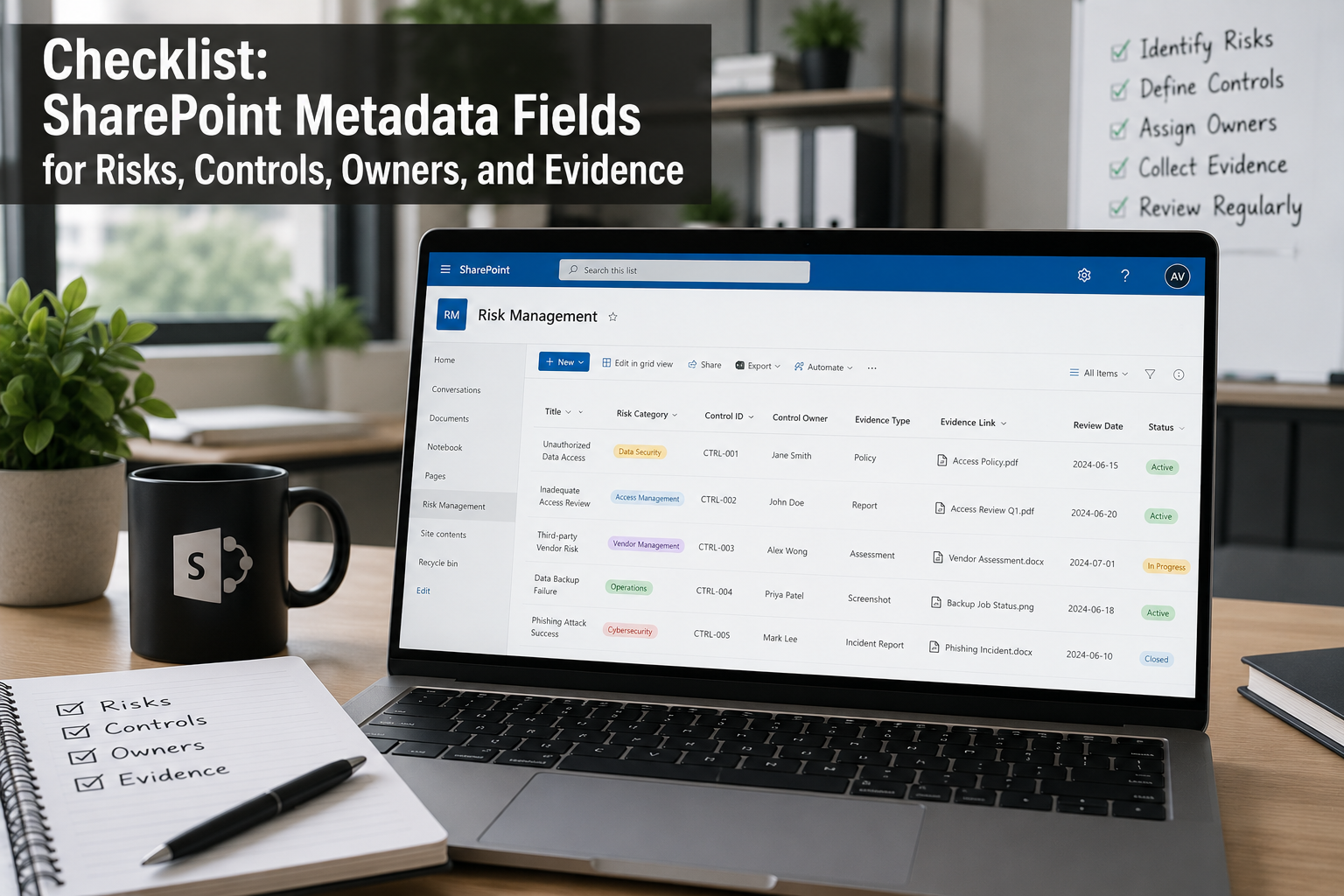
SharePoint ISMS • Metadata • Risk Register • Controls • Evidence Vault
Checklist: SharePoint Metadata Fields for Risks, Controls, Owners, and Evidence
A SharePoint ISMS should not be a messy folder system with better branding. The real power of SharePoint comes from metadata that connects risks, controls, owners, evidence, audits, corrective actions, and management review in one practical compliance workspace.
Quick Snapshot
| SharePoint Area | Metadata Should Help You Track |
|---|---|
| Risks | Risk owner, rating, treatment, due date, residual risk, and evidence. |
| Controls | Control ID, owner, framework, status, testing frequency, and evidence. |
| Owners | Accountability, department, role, backup owner, and review responsibility. |
| Evidence | Control area, evidence type, period covered, system, owner, and approval status. |
| Outcome | A SharePoint ISMS that is searchable, reportable, and audit-ready. |
Introduction
Most organizations start their SharePoint ISMS with folders.
The structure usually looks clean at first:
- Policies
- Risks
- Evidence
- Audits
- Vendors
- Management review
- Corrective actions
Then the audit starts.
The auditor asks:
- Which control does this evidence support?
- Who owns this risk?
- Which evidence is current?
- Which policies are overdue?
- Which controls are not tested?
- Which findings are still open?
- Which risks need management review?
If your SharePoint site only has folders, answering those questions becomes painful. Metadata turns SharePoint from document storage into an ISMS workspace. It helps you filter, search, report, automate, and prove control operation.
Want SharePoint to Work Like a Real ISMS?
Canadian Cyber helps organizations build SharePoint ISMS solutions with metadata, risk registers, control libraries, evidence vaults, dashboards, Power Automate workflows, and audit-ready views.
Why Metadata Matters in a SharePoint ISMS
Folders tell you where something is stored.
Metadata tells you what it means.
A file named AccessReview-Q1.pdf in a folder may tell you very little.
But that same file with metadata can tell you:
- control area
- control ID
- system
- owner
- audit period
- review status
- approval date
- related risk or finding
| Folder-Only SharePoint | Metadata-Driven SharePoint |
|---|---|
| Evidence is stored by location. | Evidence is searchable by control, owner, period, and status. |
| Auditors rely on manual explanation. | Auditors can follow evidence links and views. |
| Owners forget due dates. | Views and reminders show overdue work. |
| Risks sit in spreadsheets. | Risks connect to treatment and evidence. |
| Dashboards are manual. | Dashboards can pull from lists and libraries. |
If you want SharePoint to support ISO 27001, SOC 2, internal audits, or management review, metadata is not optional. It is the operating layer.
The Core SharePoint ISMS Data Model
A practical SharePoint ISMS should connect four core areas:
- risks
- controls
- owners
- evidence
| ISMS Element | Connects To |
|---|---|
| Risk | Risk owner, treatment action, related controls, evidence, and management review. |
| Control | Framework requirement, control owner, testing status, evidence, and audit findings. |
| Owner | Risks, controls, policies, evidence requests, and corrective actions. |
| Evidence | Control, risk, audit period, owner, system, and approval status. |
Metadata Fields for the Risk Register
Your risk register should be a SharePoint List, not just a spreadsheet hidden in a folder.
That makes it easier to filter by owner, rating, treatment, due date, and status.
| Required Risk Field | Why It Matters |
|---|---|
| Risk ID | Gives each risk a unique reference. |
| Risk Title | Creates a short name for the risk. |
| Risk Owner | Assigns accountability. |
| Likelihood and Impact | Helps calculate rating. |
| Treatment Decision | Shows whether the risk will be mitigated, accepted, transferred, or avoided. |
| Due Date | Prevents risk actions from drifting. |
| Evidence Link | Connects risk treatment to proof. |
A risk without an owner, due date, and treatment action is not managed. It is just documented anxiety.
Metadata Fields for Controls
Controls should also live in a structured SharePoint List.
This can act as your control library for ISO 27001, SOC 2, ISO 27017, ISO 27018, cyber insurance, or internal control frameworks.
| Required Control Field | Why It Matters |
|---|---|
| Control ID | Creates a unique control reference. |
| Control Name | Gives a clear control title. |
| Framework | Maps the control to ISO 27001, SOC 2, internal requirements, or cyber insurance. |
| Control Owner | Assigns accountability. |
| Testing Frequency | Supports audit planning. |
| Evidence Required | Defines what proof is needed. |
A control should tell the owner what to do and what evidence to save. If it does not, the metadata is too weak.
Need a SharePoint Risk Register and Control Library?
Canadian Cyber can design risk registers, control libraries, lookup fields, ownership models, evidence links, and audit-ready SharePoint views for ISO 27001 and SOC 2.
Metadata Fields for Owners
Many SharePoint ISMS sites fail because ownership is unclear.
A person may own a policy, control, evidence request, vendor, risk, or corrective action.
That ownership should be visible.
| Owner Field | Why It Matters |
|---|---|
| Owner Name | Identifies the accountable person. |
| Role | Shows whether the owner is IT Lead, HR Lead, vCISO, CTO, or ISMS Owner. |
| Ownership Area | Shows whether they own risk, control, policy, vendor, evidence, or audit work. |
| Backup Owner | Prevents gaps when the owner is unavailable. |
| Escalation Contact | Supports overdue actions and accountability. |
Every risk, control, evidence request, policy, and corrective action should have a named owner. Not a department. A person.
Metadata Fields for the Evidence Vault
The evidence vault is where metadata becomes very powerful.
This should be a SharePoint document library with structured fields.
| Evidence Field | Why It Matters |
|---|---|
| Evidence Title | Creates a clear evidence name. |
| Control Area | Shows whether the evidence supports access, vendor, backup, incident, logging, or another area. |
| Control ID | Maps evidence to the control library. |
| Evidence Type | Shows whether it is a report, screenshot, export, approval, ticket, or review record. |
| Period Covered | Supports audit windows such as Q1 2026 or April 2026. |
| Review Status | Shows whether evidence is not reviewed, under review, approved, or rejected. |
Evidence should be searchable by control, owner, system, period, and audit status. If you cannot filter evidence that way, audit prep will be slower than it needs to be.
Metadata Fields for Policies
Policies are core ISMS documents.
They should not sit in SharePoint like static PDFs. They need owners, approvals, review dates, and evidence links.
| Policy Field | Why It Matters |
|---|---|
| Policy Owner | Assigns accountability. |
| Approver | Assigns approval responsibility. |
| Approval Status | Shows whether the policy is draft, pending review, pending approval, approved, or archived. |
| Version | Shows the current controlled version. |
| Last Review Date | Shows policy review evidence. |
| Next Review Date | Supports review reminders. |
Metadata Fields for Vendor Risk
Vendor metadata is important if your ISMS supports supplier security, ISO 27001, SOC 2, cyber insurance, or customer reviews.
| Vendor Field | Why It Matters |
|---|---|
| Vendor Name | Identifies the supplier. |
| Vendor Owner | Assigns the internal relationship owner. |
| Criticality | Shows whether the vendor is high, medium, or low criticality. |
| Data Handled | Shows whether the vendor handles customer, employee, financial, or sensitive data. |
| System Access | Shows whether the vendor has no access, user access, admin access, or API access. |
| Approval Decision | Shows whether the vendor is approved, approved with conditions, or rejected. |
Need a SharePoint Vendor Risk Register?
Canadian Cyber can help you build a SharePoint vendor register with risk tiers, approval decisions, evidence links, remediation tracking, and review reminders.
Metadata Fields for Internal Audit
Internal audit should not be managed through scattered emails.
Use a SharePoint List so every audit request has an owner, due date, evidence link, and status.
| Audit Tracker Field | Why It Matters |
|---|---|
| Audit Request ID | Tracks each request. |
| Audit Area | Shows whether the request relates to access, vendor, policy, risk, backup, or incident response. |
| Control ID | Links the request to the control library. |
| Owner | Assigns responsibility. |
| Due Date | Supports the audit timeline. |
| Status | Shows whether the request is not started, requested, submitted, accepted, or has a finding. |
Metadata Fields for Corrective Actions
Findings only matter if they close.
Use a SharePoint corrective action register to track findings, owners, due dates, closure evidence, and verification.
| CAPA Field | Why It Matters |
|---|---|
| Finding ID | Creates a unique finding reference. |
| Finding Source | Shows whether it came from internal audit, external audit, incident, or customer review. |
| Related Control ID | Connects the finding to a control. |
| Corrective Action | Defines the fix. |
| Action Owner | Assigns accountability. |
| Closure Evidence | Proves completion. |
A corrective action is not closed until closure evidence is linked and verified.
Required vs Optional Metadata
Do not make every field required.
That is how SharePoint adoption dies. Use a small required set and make the rest optional.
| Library / List | Recommended Required Fields |
|---|---|
| Risk Register | Risk ID, title, owner, rating, treatment, due date, status. |
| Control Library | Control ID, name, owner, status, frequency, evidence required. |
| Evidence Vault | Control area, evidence type, period, owner, review status. |
| Policy Library | Owner, approver, status, version, next review date. |
| Vendor Register | Vendor owner, criticality, data handled, review status. |
| CAPA Register | Finding ID, owner, due date, status, closure evidence. |
Only make a field required if the process cannot work without it.
Useful SharePoint Views
Metadata becomes valuable when you create views.
A good SharePoint ISMS should show each owner what they owe without asking the ISMS manager.
| View | Purpose |
|---|---|
| High Risks | Shows priority risks. |
| Evidence by Control | Creates an auditor-friendly evidence view. |
| Evidence by Owner | Shows accountability. |
| Policies Due in 30 Days | Supports review planning. |
| Critical Vendors | Focuses supplier security review. |
| Overdue Corrective Actions | Supports escalation and closure. |
Metadata Naming Standards
Use consistent field names.
Do not create three versions of the same field.
| Weak Naming Habit | Better Standard Name |
|---|---|
| Owner / Responsible Person / Assigned To | Risk Owner, Control Owner, Evidence Owner, Policy Owner, or Action Owner. |
| Current / Done / Finished | Approved, closed, verified, or operating. |
| Random review labels | Not reviewed, under review, approved, rejected. |
Status names should be boring. Boring status names are easier to audit.
Power Automate Opportunities
Metadata also supports automation.
But do not automate a broken process. Define the metadata and workflow first. Then automate.
| Trigger | Automation |
|---|---|
| Policy next review date approaching | Send reminder to policy owner. |
| Evidence status set to rejected | Notify evidence owner. |
| Risk treatment overdue | Escalate to risk owner and ISMS owner. |
| Vendor review due | Send reminder to vendor owner. |
| Control test due | Create evidence request. |
Automate Your SharePoint ISMS
Canadian Cyber can configure SharePoint metadata, views, dashboards, and Power Automate workflows so your ISMS actually runs the process.
Common Mistakes to Avoid
- Mistake 1: Using folders instead of metadata. Folders help navigation. Metadata helps audit readiness. Use both.
- Mistake 2: Creating too many required fields. Too many required fields make users avoid SharePoint.
- Mistake 3: Not using lookup fields. Lookup fields help connect risks, controls, evidence, findings, and vendors.
- Mistake 4: Letting everyone invent field names. Standardize metadata names early.
- Mistake 5: Not building views. Metadata without views is underused.
- Mistake 6: Not assigning owners. Every item needs accountability.
- Mistake 7: Not reviewing stale metadata. Old owners, old statuses, and old review dates create audit confusion.
- Mistake 8: Overbuilding before users are ready. Start simple. Add maturity later.
SharePoint Metadata Checklist
Use this checklist before building or cleaning up your ISMS site.
| Question | Yes / No |
|---|---|
| Do risks have owners, ratings, treatments, due dates, and evidence links? | |
| Do controls have owners, frequencies, status, and evidence requirements? | |
| Does evidence have control area, type, period, owner, and review status? | |
| Do policies have owners, approvers, versions, and review dates? | |
| Do vendors have risk tiers, data handled, review status, and approval decisions? | |
| Do audit requests have owners, due dates, status, and evidence links? | |
| Do corrective actions have closure evidence and verification? | |
| Are required fields kept to a practical minimum? | |
| Can an auditor trace control to evidence quickly? |
If several answers are “no,” your SharePoint ISMS may need metadata redesign.
What Good Looks Like
A strong SharePoint ISMS metadata model lets you answer:
- Who owns this risk?
- Which control does this evidence support?
- Which evidence is approved?
- Which policies are overdue?
- Which vendors handle customer data?
- Which corrective actions are open?
- Which risks need management review?
- Which audit requests are still pending?
That is what makes SharePoint useful. Not just storage. A real ISMS workspace.
Canadian Cyber’s Take
At Canadian Cyber, we often see organizations using SharePoint for ISO 27001 or SOC 2 evidence, but without enough metadata.
The result is predictable.
Files are uploaded. Folders multiply. Evidence gets duplicated. Owners lose track. Audits become manual. Dashboards are hard to build. Management review takes too long to prepare.
The fix is not always a new platform.
Often, the fix is better SharePoint design.
Metadata connects the ISMS. It turns risks into action, controls into evidence, owners into accountability, evidence into audit readiness, and findings into closure.
Metadata design is one of the most important parts of a SharePoint ISMS build.
Takeaway
A SharePoint ISMS becomes powerful when risks, controls, owners, and evidence are connected.
That connection comes from metadata.
Start simple. Define the fields you need. Keep required fields practical. Use lookup fields where useful. Build views for owners and auditors. Track overdue work. Link evidence to controls. Link risks to treatment. Link findings to closure evidence.
The goal is not to create a complicated SharePoint site. The goal is to create an ISMS that people can use and auditors can follow.
How Canadian Cyber Can Help
Canadian Cyber helps organizations design and build SharePoint ISMS solutions that are practical, searchable, and audit-ready.
- SharePoint ISMS metadata design
- risk register setup
- control library setup
- evidence vault configuration
- policy library metadata
- vendor register setup
- internal audit tracker design
- corrective action register setup
- Power Automate reminders and approvals
- executive compliance dashboards
- ISO 27001 evidence mapping
- SOC 2 evidence organization
- SharePoint cleanup and redesign
- vCISO support for ISMS governance
Stay Connected With Canadian Cyber
Follow Canadian Cyber for practical guidance on SharePoint ISMS, ISO 27001, SOC 2, metadata design, audit readiness, evidence workflows, risk registers, and vCISO governance.










