SOC 2 • Evidence Collection • Automation vs Documentation
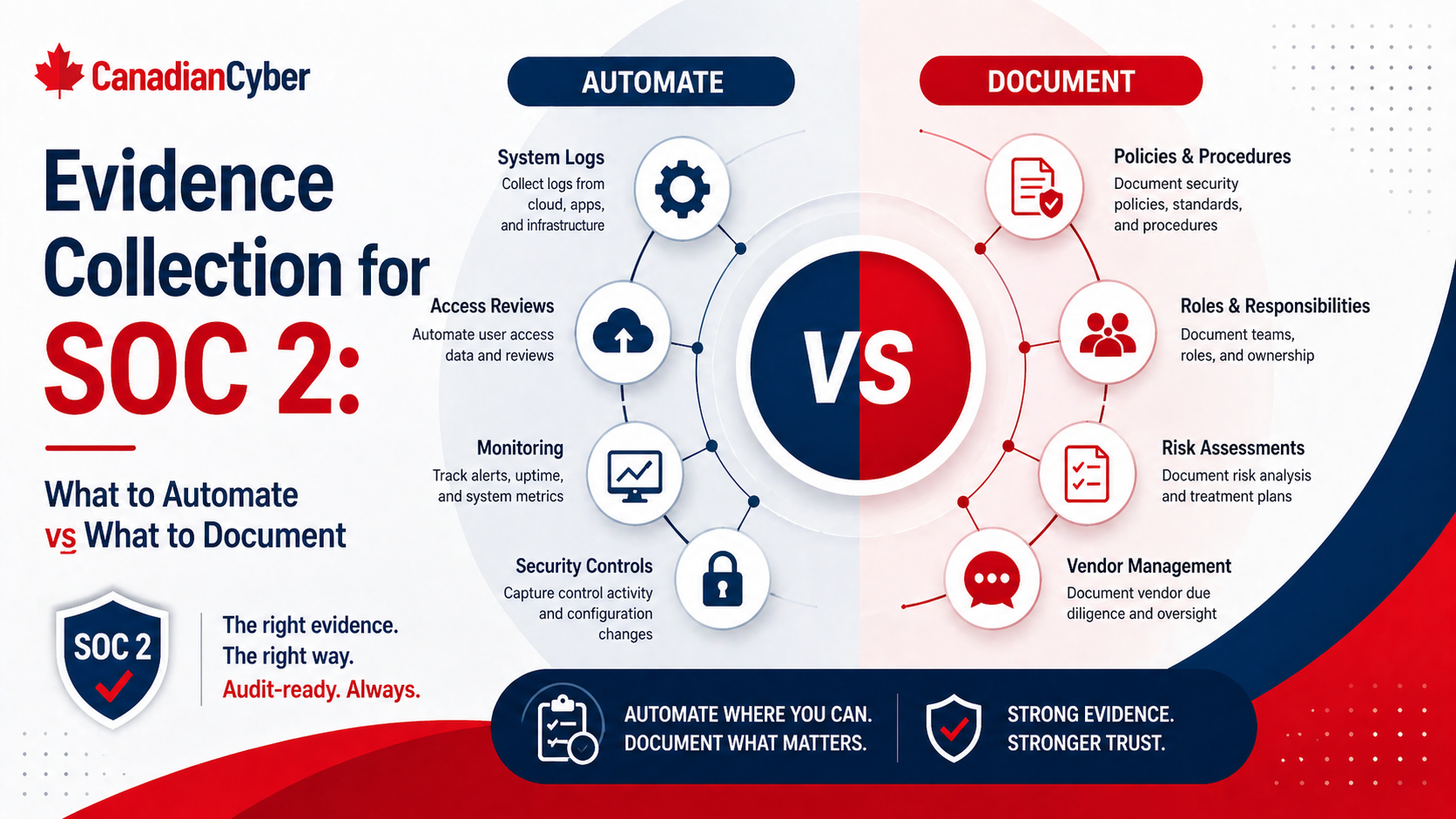
Evidence Collection for SOC 2: What to Automate vs What to Document
SOC 2 evidence collection works best when recurring system proof is automated, while risk decisions, approvals, reviews, and exceptions are documented clearly.
Quick Snapshot
| Evidence Type | Best Approach |
|---|---|
| System-Based Evidence | Automate or export from tools such as identity, cloud, LMS, endpoint, and ticketing systems |
| Judgment-Based Evidence | Document decisions, approvals, risk acceptance, incident lessons learned, and vendor review rationale |
| Evidence Tracker | Use SharePoint to link controls, owners, frequency, collection method, status, and final proof |
| Goal | Reduce manual chasing while keeping enough context for auditors to understand the control story |
Introduction
SOC 2 evidence collection can quickly become one of the most frustrating parts of audit readiness.
- Screenshots are saved in the wrong folder.
- Access reviews are exported manually.
- Vendor evidence is missing context.
- Policy approvals live in email.
- Training records come from one system.
- Change records come from another.
SOC 2 evidence collection works best when recurring, system-generated evidence is automated, while judgment-based activities are clearly documented.
Automating everything is not realistic. Documenting everything manually is not scalable. The strongest approach is a balanced evidence model.
Still Chasing SOC 2 Evidence Manually?
Canadian Cyber helps teams design SOC 2 evidence systems that combine automation, SharePoint tracking, owner workflows, and strong documentation.
Why SOC 2 Evidence Collection Gets Messy
SOC 2 is not just about having controls. It is about proving controls were designed and operating properly.
Evidence is usually needed for:
- access control
- change management
- vendor reviews
- incident response
- security awareness
- backups and monitoring
- policy approvals
- risk management
- corrective actions
The challenge is that evidence often lives across many systems: identity provider, cloud platform, ticketing system, HR system, LMS, GitHub, endpoint management, SharePoint, vendor portals, and monitoring tools.
Without a clear evidence plan, audit prep becomes a manual hunt.
The Simple Rule
Automate evidence that is recurring, system-based, and objective. Document evidence that requires human review, judgment, approval, or explanation.
| Evidence Type | Best Approach |
|---|---|
| MFA settings | Automate or export from system |
| User access lists | Automate or scheduled export |
| Code review records | Pull from source control |
| Training completion | Export from LMS |
| Vendor risk decision | Document manually |
| Incident lessons learned | Document manually |
| Risk acceptance | Document manually |
| Corrective action verification | Document with evidence link |
What to Automate for SOC 2 Evidence
1. Access Control Evidence
Access control evidence is one of the best areas to automate.
- active user lists
- admin role lists
- MFA enforcement reports
- SSO coverage
- terminated user access removal
- privileged access reports
Good Evidence Examples
- identity provider MFA report
- admin role export
- quarterly access review export
- offboarding ticket linked to access removal
- system-generated access logs
2. Change Management Evidence
If your team uses GitHub, GitLab, Jira, Azure DevOps, or similar tools, much of your change evidence can be pulled from the system.
- pull request approvals
- merge history
- deployment records
- change tickets
- CI/CD logs
- emergency change records
Automation can show that a pull request was reviewed. But for high-risk changes, add documentation that explains the risk, approval, and testing performed.
3. Security Awareness Training
Training evidence should usually come from the LMS or training platform.
- assigned users
- completion status
- completion dates
- overdue users
- phishing simulation results
- targeted retraining records
4. Endpoint and Device Evidence
Endpoint evidence is another strong automation candidate.
- device inventory
- encryption status
- EDR coverage
- patch compliance
- device ownership
- lost device wipe records
Want to Automate the Right Evidence First?
We help teams identify which SOC 2 evidence can come from systems and which items need structured documentation.
5. Cloud and Infrastructure Evidence
Cloud controls often generate strong evidence directly from the platform.
- cloud IAM reports
- logging configuration
- backup configuration
- encryption settings
- firewall or security group settings
- monitoring alerts
- vulnerability scan results
Where possible, use reports or configuration exports instead of one-off screenshots.
6. Backup and Monitoring Evidence
Backups and monitoring are recurring controls, so automate evidence wherever possible.
- backup job success reports
- restore test records
- alert configuration
- alert review logs
- incident tickets created from alerts
- uptime or availability reports
Automated backup success reports are useful. Restore testing still needs documentation because someone must record what was tested, what happened, and whether recovery worked.
What to Document Manually
1. Risk Assessments and Risk Acceptance
Risk decisions require judgment. Automation can support the workflow, but it cannot replace the decision record.
- risk statement
- inherent risk
- existing controls
- residual risk
- treatment decision
- owner
- approval
- review date
2. Vendor Reviews
A vendor report alone does not prove your company reviewed and accepted vendor risk.
- vendor criticality
- data handled
- security evidence reviewed
- risks identified
- approval decision
- next review date
- owner
3. Incident Response Records
Incident records should be documented clearly, even if alerts and tickets are automated.
- date detected
- severity
- affected systems
- response actions
- decisions made
- evidence preserved
- closure summary
- lessons learned
Need Better Manual Evidence Templates?
Canadian Cyber helps teams document risk acceptance, vendor decisions, incident reviews, corrective actions, and management review in an audit-ready format.
4. Policy Approvals
Policy files can live in SharePoint or a document management system. But approvals should still be documented.
- policy owner
- approver
- approval date
- version
- next review date
- summary of changes
5. Corrective Action Verification
Corrective actions should not close just because someone says they are done.
- finding
- root cause
- action taken
- owner
- completion date
- evidence link
- verification by reviewer
6. Management Review
Management review is a governance activity. Automation can help prepare inputs, but leadership decisions need a record.
- attendees
- topics reviewed
- risks discussed
- audit results
- incidents
- corrective actions
- vendor issues
- decisions made
- follow-up actions
The Best Evidence Collection Model
The strongest SOC 2 evidence programs usually combine three layers.
| Layer | What It Includes |
|---|---|
| 1. Automated system evidence | Reports, logs, exports, configurations, and tool-generated records |
| 2. Structured documentation | Review notes, approvals, risk decisions, incident summaries, and management records |
| 3. Evidence tracking | A tracker that links each control to owner, evidence, period, and status |
A Practical SharePoint Evidence Tracker
If you use SharePoint, create a tracker with fields like:
| Field | Purpose |
|---|---|
| Control Area | Access, change, vendors, incidents, and more |
| Evidence Request | What needs to be collected |
| Evidence Owner | Who provides it |
| Collection Method | Automated, export, or manual document |
| Frequency | Monthly, quarterly, or annually |
| Period Covered | Audit relevance |
| Status | Requested, submitted, reviewed, accepted |
| Evidence Link | Final proof |
Need a SharePoint Evidence Tracker?
We help build SOC 2 evidence trackers with control mapping, owners, collection methods, review notes, period coverage, and evidence links.
Common Mistakes to Avoid
- Relying only on screenshots: Screenshots are easy to take, but often weak without context.
- Automating without review: Automated evidence still needs someone to confirm it supports the control.
- Manually collecting recurring evidence: If evidence is needed every month or quarter, automate it where possible.
- Forgetting period coverage: Evidence must match the audit period.
- Storing files without metadata: A file is much less useful if nobody knows what control it supports.
- Treating documentation as bureaucracy: Human decisions need written records.
Canadian Cyber’s Take
At Canadian Cyber, we often see teams swing too far in one direction.
Some try to automate everything and lose important context. Others document everything manually and burn hours on repetitive collection.
The strongest SOC 2 evidence programs use automation for repeatable system proof and documentation for decisions, reviews, approvals, and exceptions.
Takeaway
SOC 2 evidence collection should not be fully manual or fully automated.
Automate evidence when it is:
- recurring
- system-generated
- objective
- exportable
- needed repeatedly
Document evidence when it involves:
- judgment
- approval
- risk decisions
- incident review
- vendor acceptance
- corrective action closure
- management review
SOC 2 evidence is not just about collecting files. It is about proving that controls worked, people made the right decisions, and the organization can support those claims clearly.
How Canadian Cyber Can Help
At Canadian Cyber, we help organizations build practical SOC 2 evidence collection systems that reduce manual work and improve audit readiness.
- SOC 2 evidence planning
- automated evidence mapping
- SharePoint evidence tracker design
- control owner workflows
- vendor, incident, and access review documentation
- audit readiness reviews
- vCISO support for continuous compliance
Stay Connected With Canadian Cyber
Follow Canadian Cyber for practical guidance on SOC 2, evidence automation, audit readiness, SharePoint compliance tracking, and vCISO support.