
Get in touch
info@canadiancyber.ca


Rafia Rizwan

April 22, 2026
A practical guide to ISMS templates in SharePoint, helping compliance leads standardize risk, incident, vendor, and audit records.
One department logs incidents one way. Another tracks risks differently. A vendor review lives in Excel. Corrective actions sit in email. Policy approvals are hard to trace. And when audit time arrives, the compliance lead is left stitching everything together by hand.
That is exactly why template standardization matters. If your organization is using SharePoint for ISO 27001, SOC 2, or broader security governance, the goal should not be to upload more files. The goal should be to create a repeatable operating structure that makes compliance easier to run, easier to review, and easier to prove.
In simpler terms, standardized ISMS templates turn SharePoint from a storage site into a working compliance system. And for compliance leads, that matters a lot.
Many compliance teams already have templates. The problem is that they are often inconsistent across departments, stored in different locations, missing required fields, outdated, not linked to workflow, and difficult for control owners to use correctly.
This creates problems that show up everywhere. Risk records are written differently every quarter. Vendor assessments are incomplete. Incident evidence is inconsistent. Audit findings are hard to compare. Management review packs take too long to prepare. SharePoint fills up with documents, but not with reliable records.
This does not just mean uploading blank Word files to a folder called Templates. It means approved templates live in one controlled location, the latest version is obvious, owners know which template to use, metadata supports sorting and filtering, workflows or lists can connect to the document where needed, old versions are controlled or archived, and the template structure supports audit-ready evidence.
A template only becomes valuable when it is part of an operating rhythm. That is what makes SharePoint such a strong fit when designed properly.
Picture this. A compliance lead is preparing for an ISO 27001 surveillance audit. The organization already has policies, risk records, incident logs, vendor reviews, internal audit notes, and corrective action trackers. But none of them are fully standardized.
Now the team runs into familiar problems. The risk register has three different entry styles. One business unit uses an old vendor review form. Incident records vary by who handled them. Corrective actions lack consistent closure evidence. The internal audit checklist changed halfway through the year. Management review slides are rebuilt from scratch every cycle.
Not every document needs a template-first approach. The templates that matter most are the ones that shape how the ISMS actually runs. These usually include governance records, risk and treatment records, evidence-heavy operational records, audit and remediation records, supplier and review records, and management reporting records.
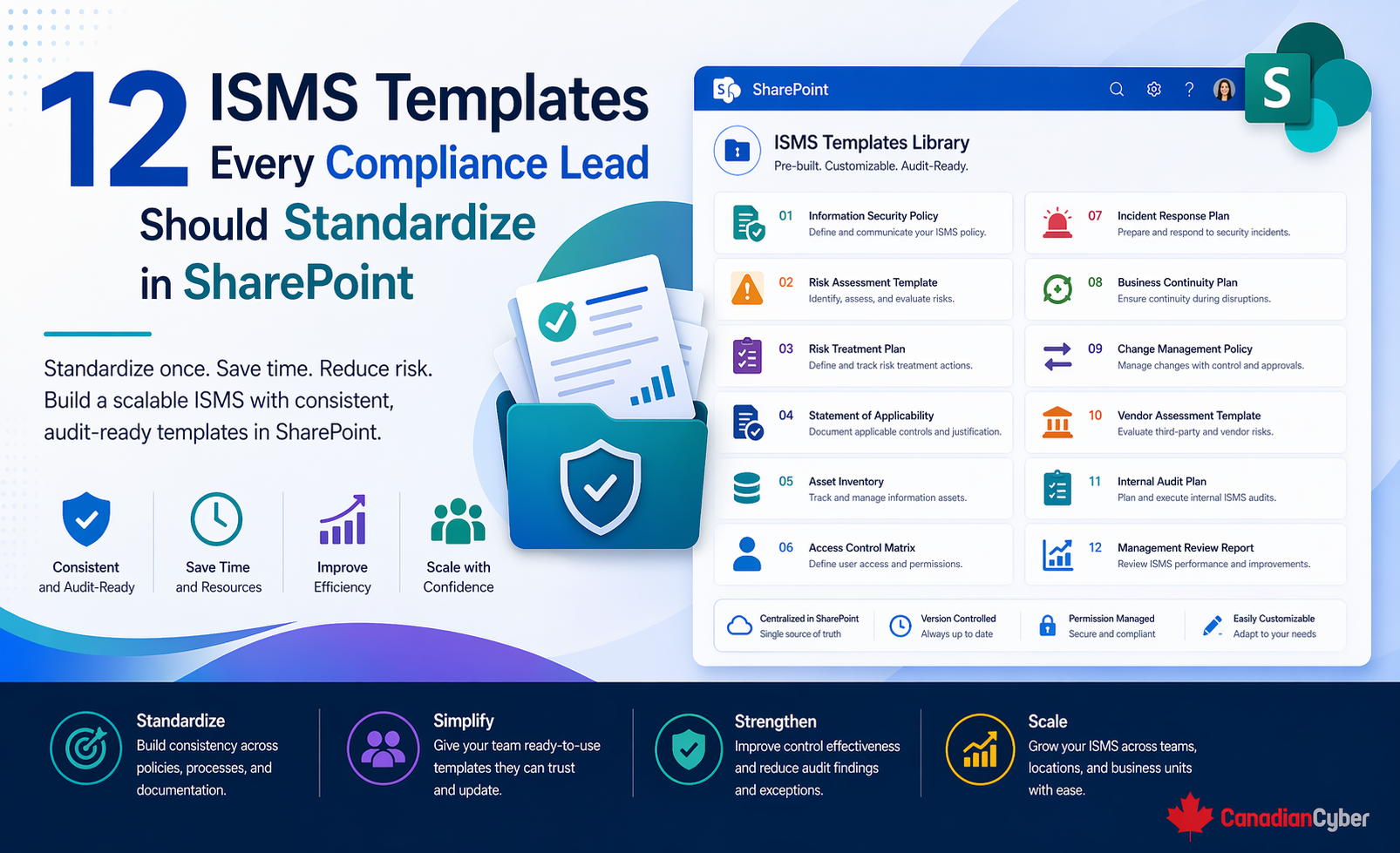
Below are the 12 templates most compliance leads should standardize in SharePoint first.
The ISMS scope is one of the most important documents in the entire program. It defines what is in scope, what is out of scope, which business activities, systems, locations, and teams are covered, and what boundaries the audit and ISMS apply to.
A controlled SharePoint template prevents teams from using outdated scope language or maintaining local copies that drift away from the approved boundary.
Risk registers often become messy because each risk is written differently. Some entries are too vague. Some mix controls and risks together. Some have no real owner. Some do not show residual risk clearly.
Whether managed as a SharePoint list or a structured form, standardization makes risks comparable, reviewable, and easier to report on during management review or audits.
A risk register shows what could go wrong. A risk treatment plan shows what the organization is going to do about it. Many organizations blur the two together. That weakens both.
This makes follow-through visible and prevents treatment plans from becoming vague notes like “improve controls.”
For ISO 27001, the Statement of Applicability is one of the most audited documents in the system. It shows which Annex A controls apply, which do not, why, how they are implemented, and where supporting evidence exists.
A controlled SharePoint version makes it easier to maintain one authoritative SoA and link supporting records more consistently.
Many ISMS programs struggle because they do not have a reliable inventory of the systems, services, and information assets they are trying to protect. An asset template helps define what is important and who owns it.
A SharePoint list works particularly well here because assets often need filtering by owner, criticality, or system type.
Access reviews are one of the most common audit focus areas. But many organizations run them inconsistently. Different reviewers use different formats. Approvals are unclear. Removed access is not documented. Evidence is scattered.
This allows the compliance lead to see which access reviews are complete, overdue, or missing evidence without hunting through multiple files.
Incident handling is often stronger operationally than it is evidentially. Teams may respond quickly, but the documentation varies too much to support audit, post-incident review, or trend analysis.
A consistent incident template makes it much easier to show that the organization does not just handle incidents, but documents and learns from them.
Corrective actions are where many compliance programs lose momentum. Findings get opened. Owners are assigned. Then status becomes unclear, evidence is missing, and closure is too informal.
This is one of the strongest use cases for SharePoint list-based tracking because overdue actions, high-priority items, and actions awaiting verification become much easier to manage.
Vendor review is one of the most common weak spots in ISO 27001 and SOC 2 programs. Without a standardized template, assessments become inconsistent and difficult to compare.
A centralized SharePoint template helps compliance leads track which vendors are reviewed, which are overdue, and which require follow-up.
Internal audits become less useful when every cycle uses a different structure. A standardized template improves consistency and makes findings more defensible.
It supports audit history, follow-up, and easier retrieval of prior audit structure during future cycles.
Management review is often more painful than it should be because teams rebuild the review input from scratch every cycle. A standardized template makes leadership reporting far more efficient.
A SharePoint-based approach lets compliance leads gather recurring inputs more quickly and keep prior review history in one controlled place.
A lot of audit pain comes from evidence inconsistency. Files exist, but there is no clean way to tell what they support, which period they cover, who owns them, or whether they are still current.
This turns the evidence library into something searchable and reviewable instead of just another folder collection.
Not every organization needs all 12 standardized on the same day. A practical rollout usually starts with the templates that create the most audit and operational value first.
| Priority order often starts with: |
|---|
| Risk Register |
| Corrective Action |
| Incident Record |
| Vendor Security Assessment |
| Access Review |
| Evidence Record |
| Management Review Pack |
| Internal Audit Plan |
| Scope Statement |
| Asset Inventory |
| Risk Treatment Plan |
| Statement of Applicability |
That sequence usually gives the team better visibility faster.
A template does not become powerful just because it exists. It becomes useful when it is easy enough for control owners to complete properly, structured enough for auditors to follow, controlled so people use the latest version, stored in the right SharePoint location, linked to metadata, lists, or workflows where appropriate, and reviewed and improved over time.
The best templates reduce decision fatigue. They help people know what fields matter, how to document the process correctly, what evidence needs to exist, and how to make records comparable over time.
These issues are avoidable when the compliance lead treats template design as part of the ISMS architecture, not just as documentation admin.
This is a high-intent topic because the people searching for it are often already trying to solve a real operational problem. They are usually asking what ISO 27001 templates they need, how to structure an ISMS in SharePoint, which compliance documents should be standardized, what templates should be used for risk, incident, vendor, and audit tracking, and how to make SharePoint useful for continuous compliance.
That means this topic attracts readers who are closer to action: compliance leads, ISO 27001 program owners, security managers, SharePoint governance teams, vCISO buyers, and operations leaders trying to organize audit readiness.
At Canadian Cyber, we often see compliance teams trying to improve their ISMS by adding more documents when the real improvement comes from standardizing the right ones.
The strongest SharePoint-based compliance environments usually succeed because they standardize the records that drive the system: risks, treatment actions, incidents, corrective actions, vendor reviews, audits, management review inputs, and evidence tracking.
That is what turns SharePoint into a practical ISMS engine instead of a storage site. Template standardization may not feel like the most exciting part of compliance leadership, but it is often one of the highest-leverage improvements a team can make. Because once the templates are right, the process around them becomes much easier to run well.
If your ISMS in SharePoint feels harder to maintain than it should, the problem may not be the platform. It may be that the organization has not standardized the templates that shape how the system actually operates.
The 12 templates that usually matter most are the ISMS Scope Statement, Risk Register Entry, Risk Treatment Plan, Statement of Applicability, Asset Inventory, Access Review, Incident Record, Corrective Action, Vendor Security Assessment, Internal Audit Plan and Checklist, Management Review Pack, and Evidence Record.
Standardize these well, and SharePoint becomes much more than a document library. It becomes a practical compliance operating system.










