
Get in touch
info@canadiancyber.ca


Rafia Rizwan

April 22, 2026
A practical guide to DIY review workflows, helping teams automate policy approvals, exception handling, and recurring compliance reminders.
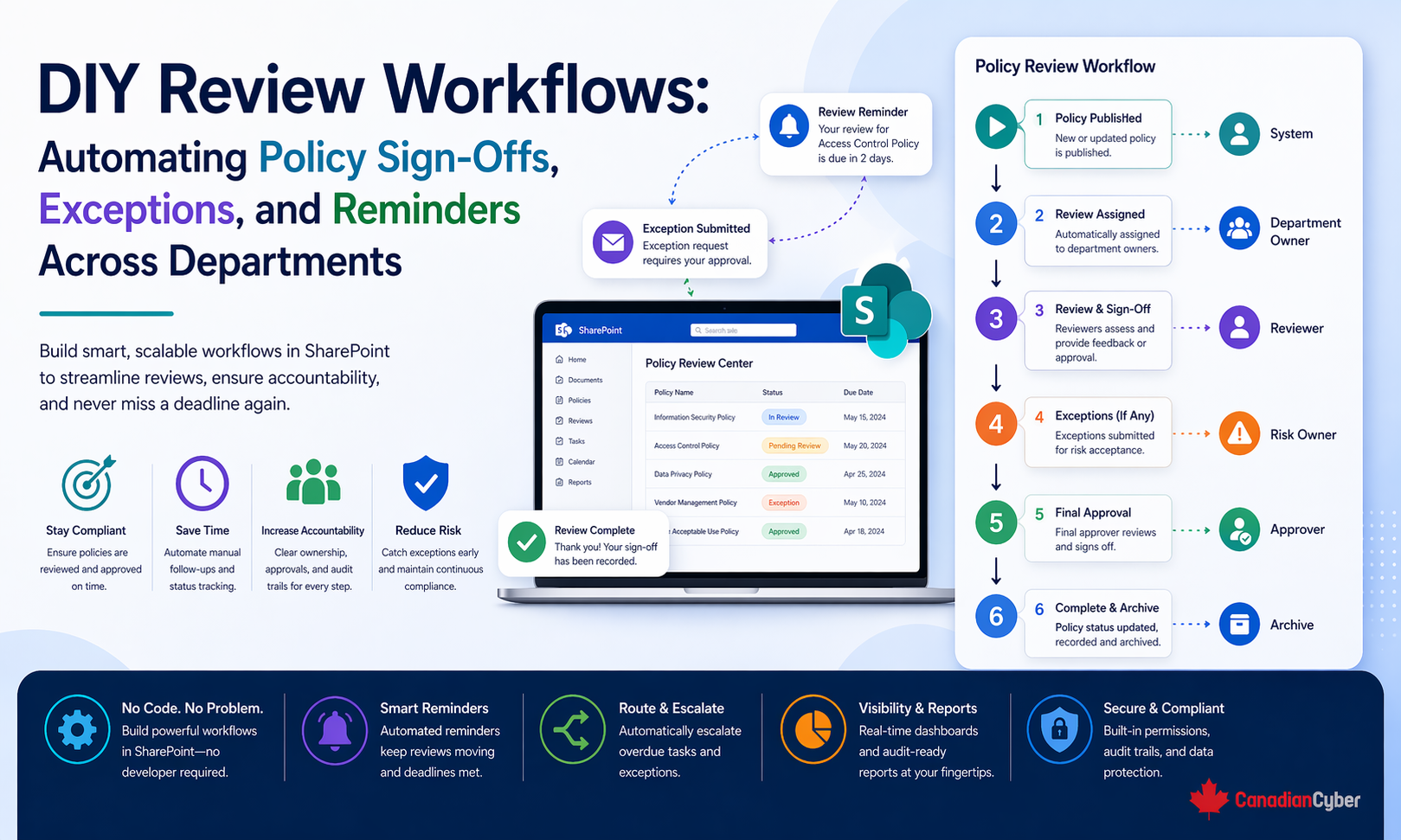
Someone forgets a policy review. An exception request sits in email too long. A department lead signs off verbally, but nobody records it. A reminder gets missed during a busy week. A policy is approved once and never properly re-reviewed again.
At first, these problems seem small. But over time, they create bigger issues: overdue reviews, inconsistent approvals, weak audit trails, stale exceptions, unclear ownership, and growing frustration across departments that already feel overloaded.
This is exactly why DIY review workflows matter. If your organization is using SharePoint, Microsoft 365, or similar internal tools, you can often automate a large part of the review cycle without buying a heavy GRC platform.
In simpler terms, good DIY review workflows help you automate the routine parts of policy sign-offs, exception handling, and reminders while keeping human judgment where it still matters.
Review work sounds simple on paper. A policy needs approval. An exception needs review. A control owner needs a reminder. A manager needs to confirm something. A due date needs to be tracked.
But once the process crosses departments, things get messy fast. Different teams work differently. Managers respond at different speeds. Priorities shift. People go on leave. Ownership changes. And the process starts depending on follow-up rather than structure.
This is when automation starts becoming valuable. Not because the process needs to become robotic, but because the administrative part of the process should not rely on one person chasing everyone manually.
A lot of teams either overestimate or underestimate automation. They overestimate it when they assume the whole review process can run itself, approvals no longer need judgment, workflow status equals quality, or exceptions can be handled like simple tickets.
They underestimate it when they assume workflows are only for giant enterprises, automation needs expensive software, simple reminders and routing are not worth improving, or manual follow-up is good enough.
The reality is somewhere in the middle. DIY workflow automation works best when it handles the repetitive parts of the process: starting the review, assigning the task, tracking the deadline, sending reminders, escalating delays, storing the record, and making status visible.
Picture this. A company has a growing ISMS and several recurring review activities: annual policy reviews, quarterly access reviews, exception requests for temporary control gaps, vendor approval sign-offs, management acknowledgment of updated standards, and corrective action follow-up across multiple departments.
Everything exists in some form. But the workflows are messy. The compliance lead sends reminders manually. Some departments respond in Teams. Some reply by email. Some save signed files in SharePoint. Some just say “approved” in a meeting. Exceptions get approved, but expiry dates are not always tracked. A few policies are technically approved, but nobody can quickly show who reviewed them or when.
Now the issue is not lack of intent. The issue is lack of a repeatable workflow. This is where a DIY automation approach can make a huge difference.
This is the most important principle in the entire topic. A good DIY workflow should automate the process steps, the notifications, the status changes, the reminders, the recordkeeping, and the dashboard visibility.
It should not try to automate away the decision quality, the risk judgment, the content review, the exception approval rationale, or the accountability of the approver.
This balance is what makes the workflow both practical and audit-friendly.
For most organizations, the best starting point is to automate three recurring areas: policy sign-offs, exception workflows, and reminders and recurring review cycles. These areas create a lot of friction manually, and they improve quickly with basic automation.
Policies often look controlled from a distance. There is a document, a version number, and maybe a review date. But in many organizations, the actual sign-off process is far less structured.
A practical DIY workflow for policy sign-offs should trigger when a policy enters review or approval stage, notify the right owner or approver, provide a link to the current document, capture the response in a consistent way, record the date of sign-off, update the policy record status, trigger reminders if no response is received, and escalate if the review remains overdue.
| Field | Why It Matters |
|---|---|
| Policy title | Identifies the document clearly |
| Owner | Shows who manages it |
| Version | Prevents review against the wrong copy |
| Review date | Supports the schedule |
| Approver(s) | Routes the task correctly |
| Approval status | Shows whether sign-off is pending or complete |
| Approval date | Creates traceable evidence |
| Next review date | Supports continuity |
A simple workflow might look like this: the policy owner updates the draft, the status changes to Pending Review, the department approver receives a task notification, reminders go out if there is no response, escalation goes to the owner or program lead if it stays overdue, and once approved, the status, approval date, and next review date are recorded.
Exceptions are one of the most useful processes to formalize. They are also one of the easiest to mishandle. Without a structured workflow, exception handling often turns into informal approvals, missing risk discussion, no expiration date, no compensating controls documented, no clear owner, and no re-review.
Exceptions are not just admin tasks. They are risk decisions. If a department wants to delay MFA rollout, keep a temporary unsupported system running, postpone a control, allow broader access for a short period, or defer a vendor remediation item, that decision needs a reason, an owner, a defined time period, approval, and follow-up.
| Field | Why It Matters |
|---|---|
| Exception ID | Supports tracking |
| Requester | Shows who initiated it |
| Affected control or process | Defines scope |
| Business reason | Explains why it exists |
| Risk description | Clarifies the exposure |
| Compensating control | Shows mitigation |
| Approver | Establishes accountability |
| Approval date | Creates traceability |
| Expiry date | Prevents indefinite drift |
| Status | Shows current state |
| Renewal or closure notes | Supports review history |
A simple exception flow might start with a standard form, route to the appropriate reviewer, record approval and expiry, and then send reminders before the expiry date so the exception gets closed, renewed, or rejected with a retained record.
This is where many organizations can get the biggest early win. A large amount of compliance friction comes from recurring review tasks that should never have required manual tracking in the first place.
These include things like policy review dates, vendor reassessment dates, access review cycles, control owner attestations, training acknowledgments, corrective action follow-up, annual document reviews, and management review input deadlines.
Manually tracking all of this across departments is one of the fastest ways to overload the compliance lead.
These workflows are especially helpful because they do not require complex logic to produce real value. They work best when the due date is structured in the system, the owner field is reliable, the status field is standardized, escalation rules are simple, and reminders are timed reasonably instead of spammed.
| Example timing | Purpose |
|---|---|
| 14 days before due date | first reminder |
| 3 days before due date | second reminder |
| 1 day after due date | overdue reminder |
| 7 days overdue | escalation |
That is often enough to improve follow-through significantly without creating alert fatigue.
SharePoint is a strong fit for review workflows because it can combine document libraries, SharePoint lists, metadata, version history, permissions, filtered views, and Microsoft 365 workflow integrations.
That makes it useful for both document-driven workflows, like policies, and record-driven workflows, like exceptions and review tasks.
This structure makes automation much easier because the workflow can act on clean, structured records instead of loose documents and emails.
These mistakes usually come from trying to make the workflow smart before making it practical.
Many organizations can build useful review automation using tools they already have.
| Need | Practical Approach |
|---|---|
| Policy storage | SharePoint document library |
| Exception tracking | SharePoint list |
| Reminder and routing automation | Microsoft 365 automation tools |
| Status and ownership views | SharePoint filtered views |
| Escalation | Email or Teams notification |
| Dashboard visibility | SharePoint views or lightweight reporting |
This is often enough for ISO 27001 programs, SOC 2 readiness, internal policy governance, vendor and access review support, and basic continuous compliance workflows. It does not need to be enterprise-grade to be effective.
One of the best ways to keep adoption strong is to start small. A practical rollout usually works like this:
| Phase | Focus |
|---|---|
| Phase 1 | Standardize the records first |
| Phase 2 | Automate one policy workflow |
| Phase 3 | Add exception handling |
| Phase 4 | Add recurring reminders |
| Phase 5 | Add owner and leadership views |
This approach keeps the process understandable and prevents workflow fatigue.
DIY workflows are not just about efficiency. They also improve the control story. Auditors and leadership usually want to understand whether reviews are happening on time, approvals are traceable, exceptions are controlled and time-bound, ownership is clear, overdue items are visible, and the organization has a repeatable process rather than a manual scramble.
A well-designed workflow helps answer all of those questions more clearly. Not because automation proves quality by itself, but because it makes the process more consistent and more visible.
At Canadian Cyber, we often see organizations trying to improve compliance discipline by asking people to “be more consistent” without changing the workflow that keeps failing them. That rarely works for long.
The teams with the strongest results usually do something more practical. They standardize the review record first, then they automate the routing, reminders, and status tracking, and they keep the approval judgment with the right people.
That balance matters. Because policy sign-offs, exceptions, and recurring reviews do not usually fail because the organization lacks good intentions. They fail because the process has too many manual points and too little visibility. A simple DIY workflow can fix a surprising amount of that.
DIY review workflows can be one of the highest-value improvements a compliance lead makes, especially when the organization already has Microsoft 365 or SharePoint in place.
The best place to start is usually with policy sign-offs, exception requests, and recurring reminders across departments. The goal is not to automate everything. It is to automate the repetitive parts so that approvals are easier to track, reminders are no longer manual, exceptions do not get lost, and departments can follow a process that is clearer and less frustrating.
Because in the end, strong review workflows are not about more bureaucracy. They are about making the right approvals happen on time, with the right record, and with much less chasing.










