SharePoint ISMS • Risk Register • ISO 27001 • SOC 2 • ISO 42001 • Multi-Framework Compliance
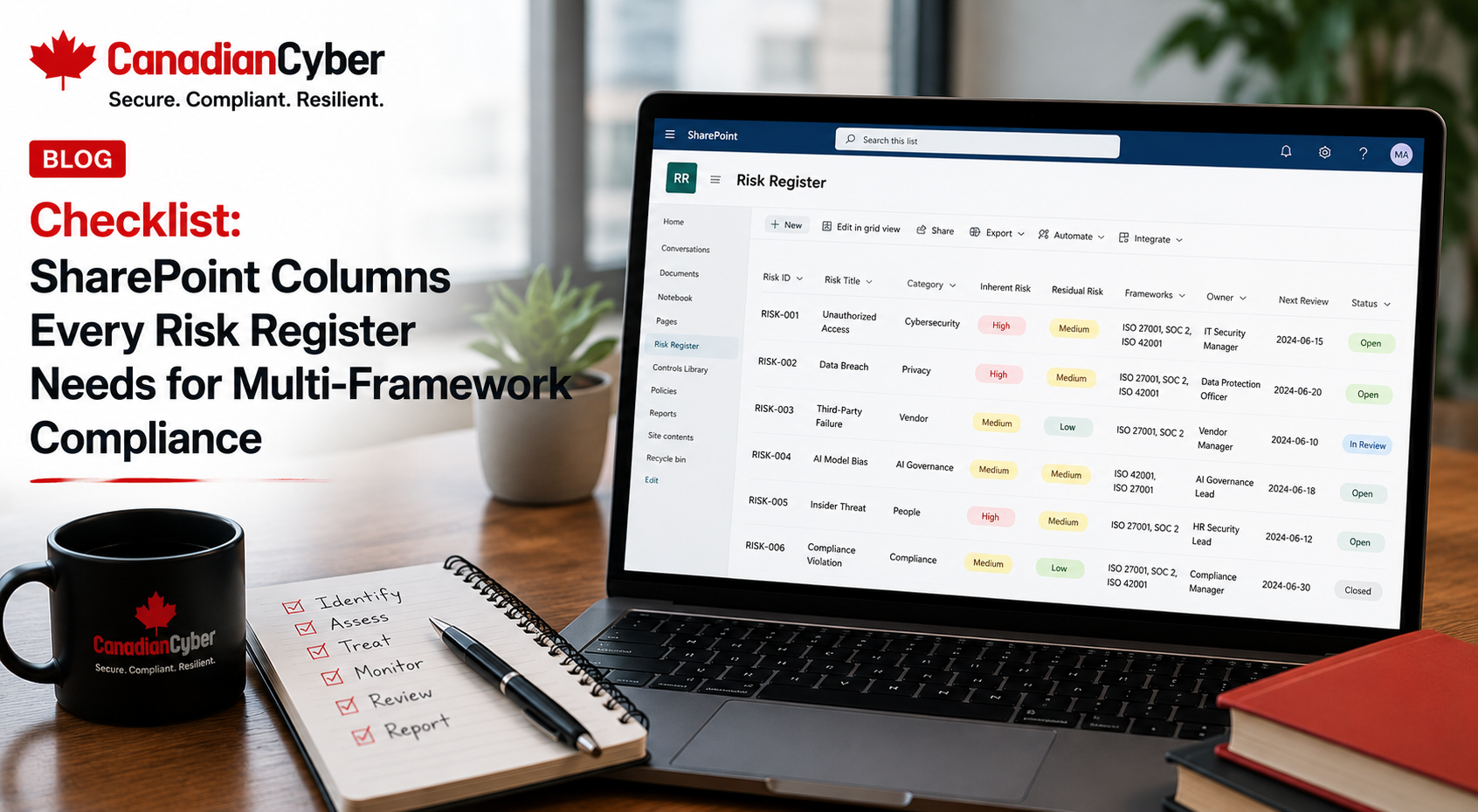
Checklist: SharePoint Columns Every Risk Register Needs for Multi-Framework Compliance
A risk register should not be a flat spreadsheet with risk names and colour-coded ratings. If you manage ISO 27001, SOC 2, ISO 42001, cyber insurance, AI governance, and customer security reviews together, your SharePoint risk register needs the right columns, metadata, owners, views, and evidence links.
Quick Snapshot
| Risk Register Area | Why It Matters |
|---|---|
| Risk Identification | Gives every risk a clear title, ID, category, source, and description. |
| Framework Mapping | Connects risks to ISO 27001, SOC 2, ISO 42001, cyber insurance, and customer requirements. |
| Ownership | Shows who owns the risk, treatment, evidence, backup role, and escalation. |
| Risk Scoring | Tracks likelihood, impact, inherent risk, residual risk, and acceptance. |
| Evidence | Links risks to controls, policies, audit proof, corrective actions, and management review. |
Introduction
Many organizations start their risk register in Excel. At first, that works.
You list risks. You add owners. You score likelihood and impact. You add a few treatment actions. You colour the high risks red.
Then compliance grows.
ISO 27001 needs risk treatment. SOC 2 needs control evidence. ISO 42001 needs AI risk governance. Cyber insurance asks about ransomware, MFA, backups, vendors, and incident response. Enterprise buyers ask about customer data, access control, cloud security, and AI vendors. Leadership asks for a dashboard.
This is where a SharePoint risk register becomes powerful. With the right columns, it can connect risks to frameworks, controls, evidence, owners, vendors, AI systems, corrective actions, audits, and management review.
Canadian Cyber’s ISMS SharePoint solution is designed to help organizations manage this structure in one practical Microsoft 365 workspace.
Want a Risk Register That Supports More Than One Framework?
Canadian Cyber’s ISMS SharePoint solution helps organizations manage risk registers, control libraries, evidence vaults, vendor registers, AI governance, internal audits, corrective actions, and management review in one structured SharePoint workspace.
Why SharePoint Columns Matter
In SharePoint, columns are not just admin fields. They are the foundation of reporting, filtering, ownership, audit readiness, and automation.
A strong SharePoint risk register can help you answer:
- Which risks support ISO 27001?
- Which risks affect SOC 2 controls?
- Which risks involve AI systems under ISO 42001?
- Which risks are overdue?
- Which risks need management review?
- Which risks have no treatment evidence?
- Which risks are accepted, and by whom?
| Spreadsheet Risk Register | SharePoint Risk Register |
|---|---|
| Hard to filter by framework. | Filter by ISO 27001, SOC 2, ISO 42001, cyber insurance, and customer reviews. |
| Owners may be text only. | Use people fields for accountability. |
| Evidence links are inconsistent. | Link directly to the SharePoint evidence vault. |
| Manual dashboards. | Use SharePoint views and Power BI if needed. |
| Audit prep is manual. | Evidence and controls are linked. |
If a risk needs to be tracked, filtered, reported, audited, or escalated, it needs a SharePoint column.
Column Group 1: Risk Identification Columns
Start with the basics. Every risk needs a clear identity.
| Column Name | Column Type | Purpose |
|---|---|---|
| Risk ID | Single line text | Unique risk reference. |
| Risk Title | Single line text | Short risk name. |
| Risk Description | Multiple lines | Explains what could go wrong. |
| Risk Category | Choice | Groups risks by theme. |
| Risk Source | Choice | Shows where the risk came from. |
| Risk Status | Choice | Shows whether the risk is open, treated, accepted, or closed. |
Suggested categories: access control, cloud security, vendor risk, AI governance, incident response, business continuity, data protection, privacy, secure development, ransomware, customer trust, and audit readiness.
Risk titles should be short, but risk descriptions should clearly explain business impact.
Column Group 2: Framework Mapping Columns
This is where multi-framework compliance becomes easier. Instead of creating separate risk registers for ISO 27001, SOC 2, ISO 42001, and cyber insurance, use framework mapping columns.
| Column Name | Column Type | Purpose |
|---|---|---|
| Framework Mapping | Multiple choice | Shows which frameworks the risk supports. |
| ISO 27001 Clause / Control | Lookup or text | Maps risk to ISO 27001 requirements. |
| SOC 2 Criteria | Choice or text | Maps risk to Trust Services Criteria. |
| ISO 42001 Requirement | Lookup or text | Maps AI-related risks to ISO 42001. |
| Cyber Insurance Relevance | Yes / No | Flags risks relevant to insurance. |
| Customer Review Relevance | Yes / No | Flags risks buyers may ask about. |
| Risk | ISO 27001 | SOC 2 | ISO 42001 | Cyber Insurance |
|---|---|---|---|---|
| Privileged access not reviewed | Yes | Yes | Yes, if AI systems included | Yes |
| AI model provider retains prompts | Yes | Maybe | Yes | Maybe |
| Restore testing missing | Yes | Yes | Maybe | Yes |
| Critical vendor not reviewed | Yes | Yes | Yes, if AI vendor | Yes |
Do not create one risk per framework if the business risk is the same. Create one risk and map it to multiple frameworks.
Column Group 3: Ownership Columns
Risk ownership is critical. A risk without an owner will not move.
| Column Name | Column Type | Purpose |
|---|---|---|
| Risk Owner | Person | Person accountable for the risk. |
| Treatment Owner | Person | Person responsible for mitigation actions. |
| Evidence Owner | Person | Person responsible for proof. |
| Backup Owner | Person | Secondary owner if primary is unavailable. |
| Executive Sponsor | Person | Leadership escalation owner. |
Use named people, not departments. “IT” cannot close a risk. A person can.
Column Group 4: Risk Scoring Columns
Risk scoring helps leadership decide what matters first. Keep scoring simple enough for teams to use.
| Column Name | Column Type | Purpose |
|---|---|---|
| Likelihood | Choice | Probability of the risk occurring. |
| Impact | Choice | Business impact if it occurs. |
| Inherent Risk Rating | Calculated or choice | Risk before treatment. |
| Existing Controls | Multiple lines | Current safeguards. |
| Residual Risk Rating | Calculated or choice | Risk after treatment. |
| Risk Trend | Choice | Increasing, stable, or decreasing. |
For a simple model, use low, medium, high, and critical. For more mature teams, use 1–5 scoring for likelihood and impact.
Do not make risk scoring so complex that owners stop updating it.
Column Group 5: Data and Asset Context Columns
For ISO 27001, SOC 2, and ISO 42001, you need to know what the risk affects.
| Column Name | Column Type | Purpose |
|---|---|---|
| Affected Asset / System | Lookup or text | Identifies impacted system. |
| Business Process | Choice or text | Links risk to workflow. |
| Data Type | Multiple choice | Shows sensitive data involved. |
| Customer Data Involved | Yes / No | Flags customer impact. |
| AI System Involved | Lookup or Yes / No | Flags ISO 42001 relevance. |
| Vendor Involved | Lookup or Yes / No | Links to vendor register. |
Useful data type options include customer data, personal information, employee data, financial data, source code, API keys, credentials, AI prompts, model outputs, embeddings, training data, support tickets, legal documents, and confidential business records.
Build a Risk Register That Connects Data, Vendors, AI, and Evidence
Canadian Cyber can help configure your SharePoint risk register so risks are mapped to assets, data types, vendors, AI systems, evidence, controls, and frameworks.
Column Group 6: Treatment and Action Columns
A risk register is not useful if it only lists risks. It must track treatment.
| Column Name | Column Type | Purpose |
|---|---|---|
| Treatment Decision | Choice | Mitigate, accept, transfer, avoid, or monitor. |
| Treatment Plan | Multiple lines | What will be done. |
| Treatment Status | Choice | Not started, in progress, blocked, completed. |
| Treatment Due Date | Date | Deadline. |
| Related Control ID | Lookup | Links to control library. |
| Related Corrective Action | Lookup | Links to CAPA register. |
Every high or critical risk should have a treatment plan, owner, due date, and evidence requirement.
Column Group 7: Evidence and Audit Columns
This is where the SharePoint risk register becomes audit-ready. Risks should connect to evidence.
| Column Name | Column Type | Purpose |
|---|---|---|
| Evidence Required | Multiple lines | Defines proof needed. |
| Evidence Link | Hyperlink or lookup | Links to evidence vault. |
| Evidence Status | Choice | Missing, under review, approved, rejected. |
| Last Evidence Review Date | Date | Shows review history. |
| Internal Audit Finding ID | Lookup or text | Links to internal audit findings. |
| Management Review Required | Yes / No | Flags leadership review. |
Evidence examples include access review reports, vendor assessments, restore test records, AI vendor reviews, policy approvals, incident tabletop reports, cloud alert reviews, change approval samples, risk acceptance approvals, and management review minutes.
If evidence is missing, the risk is not fully managed.
Column Group 8: Risk Acceptance Columns
Risk acceptance must be controlled. It should not be hidden in email.
| Column Name | Column Type | Purpose |
|---|---|---|
| Risk Accepted? | Yes / No | Shows if risk is accepted. |
| Accepted By | Person | Approver. |
| Acceptance Date | Date | When accepted. |
| Acceptance Expiry Date | Date | Prevents permanent silent acceptance. |
| Acceptance Rationale | Multiple lines | Explains why accepted. |
| Reassessment Date | Date | When to review again. |
Risk acceptance should expire. A risk accepted forever is usually a risk forgotten.
Column Group 9: AI Governance Columns for ISO 42001
If your organization is preparing for ISO 42001 or managing AI systems, add AI-specific risk columns.
| Column Name | Column Type | Purpose |
|---|---|---|
| AI System Name | Lookup | Connects to AI system register. |
| AI Use Case | Text or choice | Explains business purpose. |
| Model Provider | Lookup or text | Identifies vendor or internal model. |
| Customer Data Used? | Yes / No | Flags sensitive use. |
| Training Data Use | Choice | None, opt-in, internal, customer-approved. |
| Human Oversight Required? | Yes / No | Flags review requirement. |
| AI Impact Assessment Link | Hyperlink | Links to AI review evidence. |
AI risk examples include customer data used in prompts, AI vendor prompt retention, unapproved AI tools, RAG source permissions, excessive AI agent access, unclear training data sources, and model outputs not reviewed before customer use.
AI risks should not live in a separate spreadsheet if they affect the same ISMS.
Column Group 10: Dashboard and Reporting Columns
Leadership needs views. Not every field should be for audit only.
| Column Name | Column Type | Purpose |
|---|---|---|
| Board Reporting Flag | Yes / No | Shows board-level risks. |
| Executive Decision Needed | Yes / No | Flags leadership action. |
| Budget Required | Yes / No | Shows funding need. |
| Budget Estimate | Currency | Supports planning. |
| Target Quarter | Choice | Helps roadmap planning. |
| Escalation Status | Choice | None, owner, executive, board. |
Useful views include high risks, AI risks, vendor risks, SOC 2 risks, ISO 27001 risks, ISO 42001 risks, risks needing evidence, accepted risks expiring soon, management review required, board-level risks, and risks by owner.
Need Dashboards, Owner Views, and Audit-Ready Risk Reporting?
Canadian Cyber can help build SharePoint views for owners, auditors, leadership, management review, ISO 27001, SOC 2, ISO 42001, vendor risk, and AI governance.
Minimum Column Set for a Simple SharePoint Risk Register
If your team is just starting, do not overbuild. Start with a minimum usable set.
| Minimum Required Column | Type |
|---|---|
| Risk ID | Text |
| Risk Title | Text |
| Risk Description | Multiple lines |
| Risk Category | Choice |
| Risk Owner | Person |
| Likelihood and Impact | Choice |
| Treatment Decision and Plan | Choice / multiple lines |
| Treatment Owner and Due Date | Person / date |
| Framework Mapping | Multiple choice |
| Evidence Required and Evidence Link | Multiple lines / hyperlink |
Example SharePoint Risk Register Row
Here is how one AI risk might look in a useful SharePoint risk register.
| Column | Example Entry |
|---|---|
| Risk ID | RISK-AI-004 |
| Risk Title | AI vendor retains customer prompts |
| Risk Category | AI Governance |
| Risk Owner | CTO |
| Framework Mapping | ISO 27001, ISO 42001, SOC 2, Customer Security Review |
| AI System Name | Customer Support AI Assistant |
| Vendor Involved | LLM Provider |
| Treatment Plan | Review enterprise agreement, confirm retention settings, and document customer data use statement. |
| Evidence Required | AI vendor review, DPA, retention screenshot, and approved customer data use statement. |
How Canadian Cyber’s ISMS SharePoint Solution Helps
Building a multi-framework risk register from scratch can take time. You need column design, metadata standards, framework mapping, risk scoring logic, views, permissions, evidence links, owner dashboards, audit traceability, and management review reporting.
Canadian Cyber’s ISMS SharePoint solution helps organizations start with a structured approach.
| The Solution Can Support | Why It Matters |
|---|---|
| Risk Register | Tracks multi-framework risks in one place. |
| Control Library | Connects risks to controls and owners. |
| Evidence Vault | Stores audit-ready proof. |
| Vendor Register | Supports supplier and AI vendor risk. |
| AI System Register | Supports ISO 42001 and AI governance. |
| Management Review Library | Supports leadership visibility and decisions. |
Build My Multi-Framework SharePoint Risk Register
Canadian Cyber can help configure your SharePoint risk register for ISO 27001, SOC 2, ISO 42001, cyber insurance, and customer security reviews.
Common Mistakes to Avoid
- Using too few columns. A risk title and rating are not enough. You need owner, treatment, evidence, and framework mapping.
- Using too many required columns. If every field is required, users may avoid updating risks.
- No framework mapping. Without mapping, you will duplicate risks across ISO 27001, SOC 2, and ISO 42001.
- No evidence link. A risk without treatment evidence is hard to defend in audit.
- No acceptance expiry. Accepted risks should be reviewed again.
- AI risks in a separate spreadsheet. AI risks should connect to security, vendor, data, and incident controls.
- No views. Columns are powerful only when you create useful views.
SharePoint Views Every Risk Register Should Have
| View | Purpose |
|---|---|
| All Open Risks | Full active register. |
| High and Critical Risks | Leadership focus. |
| Risks by Owner | Accountability. |
| Overdue Treatments | Escalation. |
| Evidence Missing | Audit readiness. |
| ISO 42001 / AI Risks | AI governance. |
| Accepted Risks | Risk acceptance review. |
| Management Review Required | Leadership agenda. |
Views turn the risk register from a database into a management tool.
Risk Register Column Checklist
Use this before launching your SharePoint risk register.
| Question | Yes / No |
|---|---|
| Does every risk have a unique Risk ID? | |
| Are risks categorized clearly? | |
| Is each risk mapped to one or more frameworks? | |
| Is there a named risk owner? | |
| Is there a treatment owner? | |
| Are likelihood and impact defined? | |
| Is inherent risk tracked? | |
| Is residual risk tracked? | |
| Is the treatment decision documented? | |
| Is evidence required defined? | |
| Is evidence linked? | |
| Are accepted risks approved and time-bound? | |
| Are AI risks mapped to AI systems where relevant? | |
| Are vendor risks linked to vendors where relevant? | |
| Are views created for owners, auditors, and leadership? |
If several answers are “no,” your SharePoint risk register may not be ready for multi-framework compliance.
What Good Looks Like
A strong SharePoint risk register for multi-framework compliance has:
- clear risk IDs
- risk categories
- framework mapping
- risk owners
- treatment owners
- likelihood and impact
- inherent and residual risk
- treatment plans
- due dates
- evidence links
- control mapping
- vendor links
- AI system links
- risk acceptance approvals
- management review flags and dashboard views
It should support ISO 27001, SOC 2, ISO 42001, cyber insurance, and customer security reviews without duplicating work.
Canadian Cyber’s Take
At Canadian Cyber, we often see risk registers that look complete but are not useful.
They have risks. They have ratings. They may even have owners. But they do not connect to evidence, frameworks, controls, vendors, AI systems, corrective actions, or management review.
That creates problems during audits and customer reviews.
A modern risk register should be more than a list. It should be the centre of the ISMS. For organizations managing ISO 27001, SOC 2, and ISO 42001 together, SharePoint can be a powerful risk management workspace when designed correctly.
Takeaway
A SharePoint risk register is only as strong as its columns.
For multi-framework compliance, you need more than risk name and rating. You need columns for:
- framework mapping
- owners
- risk scoring
- assets and data
- AI systems
- vendors
- treatment plans
- evidence
- risk acceptance
- management review
- dashboard reporting
Start simple. Add maturity as your ISMS grows. And if you want to avoid building everything from scratch, Canadian Cyber’s ISMS SharePoint solution can give your team a practical foundation.
How Canadian Cyber Can Help
Canadian Cyber helps organizations build SharePoint ISMS solutions that support multi-framework compliance across ISO 27001, SOC 2, ISO 42001, cyber insurance, and customer trust requirements.
- SharePoint risk register setup
- multi-framework control mapping
- ISO 27001 risk management
- SOC 2 evidence mapping
- ISO 42001 AI risk tracking
- AI system register setup
- vendor risk register setup
- evidence vault configuration
- policy library setup
- internal audit tracker setup
- corrective action register setup
- management review dashboards
- Power Automate reminders
- vCISO support for governance
Stay Connected With Canadian Cyber
Follow Canadian Cyber for practical guidance on SharePoint ISMS, risk registers, ISO 27001, SOC 2, ISO 42001, AI governance, evidence management, internal audits, and vCISO support.