



ISO 27001
Internal Audit
Corrective Actions
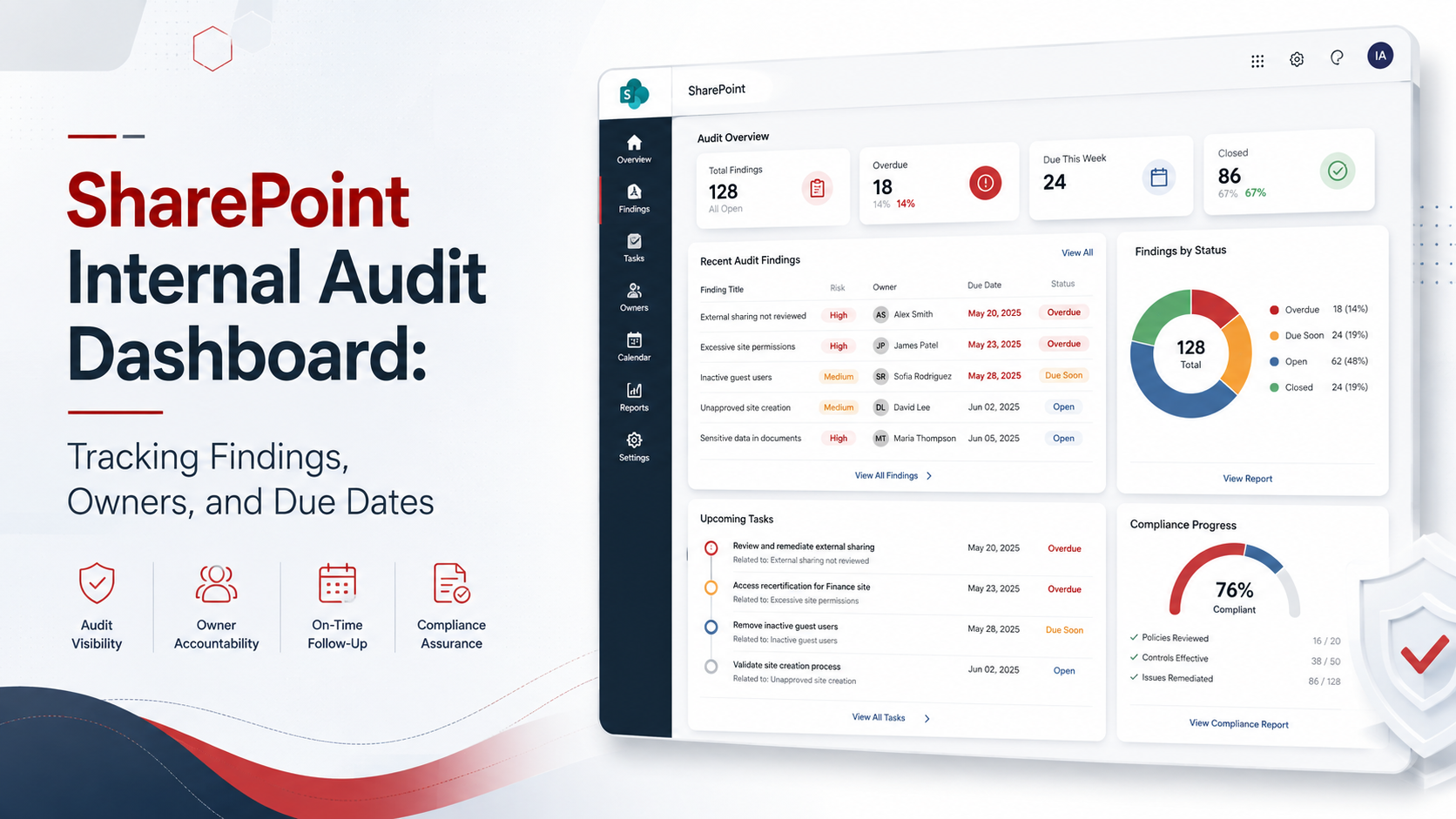
SharePoint Internal Audit Dashboard: Tracking Findings, Owners, and Due Dates
ISO 27001 internal audit should create clarity. A SharePoint dashboard helps teams track findings, owners, due dates, evidence, verification, and management reporting in one controlled workspace.
Quick Answer
What does a SharePoint internal audit dashboard track?
A SharePoint internal audit dashboard tracks ISO 27001 findings, owners, due dates, corrective actions, evidence links, risk levels, verification status, and management reporting.
It replaces scattered spreadsheets, emails, folders, and manual follow-ups with one structured audit workspace.
Bottom line: The best dashboard shows what is open, overdue, high risk, assigned, verified, and ready for management review.
Canadian Cyber SharePoint ISMS Support
Build a SharePoint Dashboard for Audit Findings and Corrective Actions
Canadian Cyber helps organizations build SharePoint internal audit dashboards for ISO 27001 findings, owners, due dates, corrective actions, evidence links, verification, and leadership reporting.
We can design your dashboard, build SharePoint lists and libraries, map findings to controls, automate reminders, and create auditor-ready and executive-ready views.
Quick Snapshot
| Dashboard Area | What It Tracks |
|---|---|
| Findings Register | NCRs, OFIs, observations, and evidence gaps. |
| Owners | Named accountable people responsible for action. |
| Due Dates | Target completion dates and overdue items. |
| Corrective Actions | Correction, root cause, action plan, and status. |
| Evidence Links | Proof uploaded to SharePoint libraries. |
| Verification | Independent review before closure. |
| Risk Impact | High, medium, low, or certification blocker. |
| Automation | Reminders, escalations, Teams alerts, and status updates. |
Why Internal Audit Dashboards Matter
Internal audit findings are only useful if they are acted on.
A finding without ownership becomes a reminder.
A finding without a due date becomes a future problem.
A finding without evidence becomes an opinion.
A finding without verification becomes a weak closure.
Internal audit follow-up should be managed like a governance workflow, not a loose spreadsheet.
Who This Blog Is For
- ISO 27001 implementation teams.
- ISMS managers and internal auditors.
- Compliance leads, security managers, and IT managers.
- Risk owners and control owners.
- vCISO teams and cybersecurity leaders.
- Canadian businesses preparing for ISO 27001 certification.
- Organizations preparing for surveillance audits.
- Companies using Microsoft 365 and SharePoint.
- SaaS, MSP, FinTech, HealthTech, AI, and technology companies.
- Organizations tired of managing audit findings in spreadsheets.
The Problem With Spreadsheet-Based Audit Tracking
Spreadsheets are easy to start with.
They are not always easy to control.
A spreadsheet can list audit issues, but it often fails to manage the process around those issues.
Practical rule: Spreadsheets can record audit issues, but dashboards help manage accountability.
What a SharePoint Internal Audit Dashboard Should Do
A strong SharePoint dashboard should make the next action obvious.
It should answer five simple questions.
1. What findings are open?
Show active NCRs, OFIs, observations, and evidence gaps.
2. Who owns each finding?
Use named accountable owners, not vague departments.
3. When is each action due?
Show deadlines clearly and highlight overdue items.
4. What evidence proves closure?
Link findings directly to closure evidence.
5. Has closure been verified?
Use a pending verification workflow before closure.
Core Components of a SharePoint Internal Audit Dashboard
| Component | Purpose |
|---|---|
| Findings Register | Main list of audit findings. |
| Corrective Action Tracker | Tracks root cause, action, owner, status, and closure. |
| Evidence Library | Stores supporting proof. |
| Audit Request Tracker | Tracks auditor requests and responses. |
| Risk Register Link | Connects findings to risks. |
| Control Register Link | Connects findings to ISO clauses or Annex A controls. |
| Owner Dashboard | Shows each owner’s open actions. |
| Management Dashboard | Shows executive-level status. |
| Verification Queue | Shows actions ready for closure review. |
| Overdue View | Shows items past due date. |
The dashboard should connect findings, evidence, owners, risks, and controls.
SharePoint List 1: Internal Audit Findings Register
The findings register is the heart of the dashboard.
It should capture every audit issue in a structured way.
| Suggested Field | Example |
|---|---|
| Finding ID | IA-2026-014 |
| Finding Type | Minor NCR, OFI, Observation, Evidence Gap |
| Audit Source | ISO 27001 Internal Audit |
| ISO Reference | Clause 9.2, Annex A access control |
| Finding Summary | Privileged access review was incomplete |
| Risk Level | High |
| Business Impact | Excessive admin access may remain active |
| Owner | IT Manager |
| Due Date | 2026-09-15 |
| Status | Open, In Progress, Pending Verification, Closed |
| Evidence Required | Access review, sign-off, removed access proof |
| Verification Owner | ISMS Manager or vCISO |
SharePoint List 2: Corrective Action Tracker
The corrective action tracker should go deeper than the finding.
It should explain how the organization will fix the issue and prevent recurrence.
Corrective Action Example
Finding: Vendor reviews were incomplete.
Root Cause: Vendor register did not include risk rating or review dates.
Immediate Correction: Complete missing reviews for critical vendors.
Corrective Action: Update vendor register with owner, risk rating, review frequency, next review date, and automated reminders.
Closure Evidence: Completed vendor reviews and updated register.
Verification: vCISO confirms evidence and next review workflow.
Practical rule: Corrective action should fix the process, not only the audit record.
SharePoint Library: Closure Evidence
Audit findings should link directly to evidence.
Do not leave closure evidence buried in emails, chats, personal folders, or screenshots.
| Evidence Metadata Field | Example |
|---|---|
| Evidence Name | Q3 Privileged Access Review |
| Finding ID | IA-2026-014 |
| Control Area | Access Control |
| Owner | IT Manager |
| Evidence Type | Review Record |
| Period Covered | Q3 2026 |
| Status | Approved |
| Linked Corrective Action | CA-2026-014 |
Evidence examples include:
- Access review exports and sign-off records.
- Vendor assessments and updated policies.
- Training reports and restore test results.
- Incident tabletop reports and management review minutes.
- Risk register updates and SoA updates.
- Approval records and closure verification notes.
Still Tracking Audit Findings in Excel?
Canadian Cyber can build your SharePoint findings register, corrective action tracker, evidence library, overdue view, verification queue, and management dashboard.
Dashboard Views to Build in SharePoint
1. Executive Summary View
Executives need risk, readiness, and accountability.
Show total findings, high-risk findings, overdue actions, certification blockers, pending verification, and management decisions required.
2. Owner Action View
Each control owner needs a personal action list.
Show finding ID, action required, due date, evidence required, comments, and verification status.
3. Overdue Actions View
Overdue findings should not be hidden.
Show owner, due date, days overdue, risk level, escalation owner, and next action.
4. Pending Verification View
Owners should not close their own findings.
Show evidence submitted, verification owner, result, rework required, and closure date.
5. Certification Readiness View
Certification blockers need special visibility.
Show open high-risk findings, unverified corrective actions, evidence gaps, and Stage 2 action list.
Example Executive Dashboard View
| Metric | Status |
|---|---|
| Total Findings | 24 |
| High-Risk Findings | 5 |
| Overdue Actions | 3 |
| Pending Verification | 6 |
| Certification Blockers | 2 |
| Closed and Verified | 10 |
| Management Decisions Required | 2 |
Overdue Actions and Escalation Logic
Overdue findings should trigger action.
The dashboard should show overdue status clearly and support escalation.
| Days Overdue | Suggested Action |
|---|---|
| 1–7 Days | Reminder to owner. |
| 8–14 Days | Notify owner and ISMS manager. |
| 15–30 Days | Escalate to department leader. |
| 30+ Days | Include in management review. |
| High-Risk Overdue | Escalate immediately. |
Practical rule: Overdue high-risk findings should not wait for the next audit.
Pending Verification: The Closure Control
A common mistake is allowing owners to close their own findings.
A better process is to use a pending verification status.
Verification Questions
- Does the evidence prove completion?
- Was the root cause addressed?
- Is the action repeatable?
- Is the control now operating?
- Were exceptions resolved?
- Should the finding stay open?
- Should management be informed?
Closure should be verified by someone independent enough to challenge the evidence.
Power Automate Workflows to Add
Power Automate can reduce manual follow-up.
It keeps audit follow-up moving when people get busy.
Status Values That Work Well
| Use These Statuses | Avoid These Statuses |
|---|---|
|
Not Started In Progress Blocked Evidence Submitted Pending Verification Needs Rework Closed and Verified Deferred with Approval |
Working on it Almost done Need to check Waiting Maybe complete Done maybe |
Owner and Role Permissions
SharePoint dashboards should be useful without exposing sensitive information unnecessarily.
Use clear role-based access.
| Role | Suggested Access |
|---|---|
| ISMS Manager | Full dashboard access. |
| Internal Auditor | Audit evidence and findings access. |
| Control Owner | Own findings and evidence. |
| Executive Sponsor | Dashboard and summary view. |
| Department Leader | Team-level findings. |
| External Auditor | Restricted evidence room only when approved. |
| Client or Buyer | Client-ready evidence only. |
Key Metrics to Track
Track metrics that help reduce risk and improve accountability.
SharePoint Dashboard Build Checklist
| Build Step | Ready? |
|---|---|
| Create an internal audit findings register. | |
| Create a corrective action tracker. | |
| Create a closure evidence library. | |
| Add metadata for finding ID, owner, due date, status, risk level, and evidence link. | |
| Create views for executives, owners, overdue actions, pending verification, and certification readiness. | |
| Link findings to ISO clauses, Annex A controls, risks, and evidence. | |
| Add Power Automate reminders before due dates. | |
| Add overdue escalation notifications. | |
| Add a pending verification workflow. | |
| Create a management review dashboard. | |
| Define permissions for owners, auditors, executives, and external parties. | |
| Verify closure evidence before marking findings closed. |
Common Mistakes to Avoid
Roles, statuses, evidence rules, and workflows must be defined.
“IT” is not enough. Assign a named owner.
Every closed finding should link to proof.
Owners should not be the only people closing their own findings.
Overdue findings should trigger action.
Leadership needs a simple readiness dashboard.
How Canadian Cyber Helps
Canadian Cyber helps organizations design and implement SharePoint internal audit dashboards for ISO 27001, SOC 2 readiness, ISO 42001 AI governance, and broader cybersecurity governance.
We help teams move from spreadsheet-based tracking to structured SharePoint workflows that improve visibility, accountability, and audit readiness.
Canadian Cyber can support:
- SharePoint internal audit dashboard design.
- ISO 27001 findings tracker setup.
- Corrective action tracker setup.
- NCR and OFI register setup.
- Closure evidence library design.
- Owner dashboard creation.
- Executive dashboard creation.
- Power Automate reminders and Teams notifications.
- Management review dashboard.
- Risk register and Statement of Applicability tracker integration.
- Audit request tracker setup.
- Client-ready evidence room setup, ISO 27001 internal audits, vCISO services, SOC 2 readiness, ISO 42001 AI governance, and cybersecurity assessments.
Canadian Cyber’s ISMS SharePoint Solution
Canadian Cyber’s ISMS SharePoint Solution helps organizations manage ISO 27001 audit evidence and findings inside Microsoft 365.
It can include:
- Policy library and risk register.
- Statement of Applicability tracker and control register.
- Internal audit workspace and audit findings register.
- NCR tracker, OFI tracker, and corrective action tracker.
- Closure evidence library and audit request tracker.
- Owner dashboard and management review dashboard.
- Power Automate reminders and Teams notifications.
- Auditor-ready views and client-ready evidence room.
Frequently Asked Questions
What is a SharePoint internal audit dashboard?
A SharePoint internal audit dashboard is a structured workspace that tracks audit findings, owners, due dates, corrective actions, evidence links, verification status, overdue actions, and management reporting.
Can SharePoint track ISO 27001 internal audit findings?
Yes. SharePoint can track ISO 27001 findings using lists, metadata, document libraries, views, permissions, Power Automate reminders, and Teams notifications.
What should be included in an audit findings tracker?
A findings tracker should include finding ID, finding type, ISO reference, risk level, owner, due date, status, root cause, corrective action, evidence required, evidence link, verification owner, and closure date.
Why is verification important before closing findings?
Verification confirms that the corrective action was completed, evidence is sufficient, root cause was addressed, and the issue is less likely to repeat.
Can SharePoint replace Excel for audit tracking?
Yes. SharePoint can provide stronger version control, permissions, views, automation, evidence links, and dashboard reporting compared with standalone spreadsheets.
Can Canadian Cyber build a SharePoint audit dashboard?
Yes. Canadian Cyber can design and implement SharePoint internal audit dashboards, corrective action trackers, evidence libraries, management review dashboards, and auditor-ready evidence views.
Takeaway
ISO 27001 internal audit does not end when findings are written.
The real work is tracking what happens next.
A SharePoint internal audit dashboard helps organizations manage findings, owners, due dates, corrective actions, evidence, verification, overdue items, risk impact, certification readiness, and management reporting.
For organizations already using Microsoft 365, SharePoint can become a practical ISMS command center.
The result is stronger evidence, fewer missed deadlines, better leadership reporting, and more confidence before certification or surveillance audit.
Ready to Move ISO 27001 Audit Tracking Out of Spreadsheets?
Canadian Cyber can help you build a SharePoint internal audit dashboard that tracks findings, owners, due dates, corrective actions, evidence, and management reporting.
We provide SharePoint internal audit dashboards, ISO 27001 findings trackers, corrective action workflows, evidence libraries, Power Automate reminders, management review dashboards, vCISO services, ISO 27001 internal audits, SOC 2 readiness alignment, ISO 42001 AI governance readiness, and cybersecurity assessments.
Stay Connected With Canadian Cyber
Follow Canadian Cyber for practical guidance on SharePoint ISMS, ISO 27001 internal audits, audit dashboards, corrective actions, SOC 2, ISO 42001, ISO 27017, ISO 27018, vCISO services, cybersecurity assessments, and certification readiness.










